
AI for Small Business: A Practical Starter Guide
Most advice about AI and small business is written for one of two imaginary readers. The first is a venture-backed startup that wants to “leverage AI” to disrupt an industry. The second is a nervous employee worried a robot is coming for their desk. If you run an actual small business — a dental practice, a plumbing company, a two-person marketing shop, a café with a catering side, a bookkeeping firm — you are neither of those people, and almost none of the coverage is aimed at you.
You have a different problem. You have too much to do and not enough hours, you keep hearing that AI could help, and every time you look into it you hit a wall of hype, jargon, and forty tools all claiming to be essential. You don’t want a strategy deck. You want to know, in plain terms: is this actually useful for a business like mine, where would it help, what does it cost, and how do I not get burned.
That’s what this guide is. It assumes you’re smart, busy, and skeptical — that you’ve seen technology fads come and go, and you’re not interested in another one. It also assumes you’re new to AI itself, so nothing here requires you to already know what a “large language model” is or to have written a line of code. The goal is to get you from “I keep hearing about this” to “I’ve got one or two AI tools quietly saving me a few hours a week,” without the wasted afternoons in between.
A word on tone before we start, because it shapes everything that follows. There is no claim here that AI will transform your business overnight, and no suggestion that you’re doomed if you ignore it. Both of those stories sell newsletters; neither is true. What’s true is more modest and more useful: for a specific set of everyday tasks, these tools are now genuinely good, cheap, and easy enough that not knowing how to use them is starting to cost small businesses real time. This guide is about capturing that — the boring, compounding, few-hours-a-week kind of value — and leaving the science fiction to other people.
Quick answer: You don’t need a strategy, a budget line, or a technical background to start using AI in a small business. Start with one recurring task that eats your time — drafting the same kinds of emails, writing social posts, answering repetitive customer questions, summarizing meetings. Use one free, general-purpose assistant (ChatGPT, Claude, or Gemini) for a couple of weeks on real work before paying for anything. Add a specialized tool only when a task is frequent enough that the general one visibly struggles. Keep genuinely confidential data out of consumer free tiers. Measure time saved on real tasks, and cancel anything that isn’t clearly earning its ~$20 a month.
Here’s what you’ll walk away knowing:
- What AI actually is in business terms — stripped of the jargon — and, just as importantly, what it isn’t and can’t reliably do.
- Where AI genuinely earns its place in a small business, mapped to the everyday jobs you already do: marketing, customer service, admin, sales, finance, and meetings.
- A concrete 30-day starter plan you can follow around a full workload, one small step at a time, with nothing to install and nothing to configure.
- How to choose your first tools without drowning in options, and why the right “stack” for most small businesses is smaller than you’d think.
- What it really costs — including the costs that never appear on the pricing page — and how to avoid the quiet subscription creep that wastes most AI budgets.
- The risks nobody puts on the sales page: data privacy, confidentiality, accuracy, legal exposure, and customer trust — and the simple habits that keep you out of trouble.
What AI actually is, in business terms
For the purposes of running a business, you can think of today’s AI as a fast, tireless, confident assistant who has read an enormous amount of text and can produce more of it on demand — and who occasionally makes things up with a completely straight face. That mental model is imperfect, but it will steer you right far more often than the marketing will.
The specific technology behind the current wave is the large language model, or LLM — the engine inside tools like ChatGPT, Claude, and Gemini. In plain terms, an LLM is a system trained on a vast amount of writing to predict what words should come next, which turns out to be a surprisingly powerful way to draft, summarize, rewrite, translate, explain, and answer questions. You don’t need to understand the mechanics to use it, any more than you need to understand an internal combustion engine to drive a van — but a one-paragraph sense of how large language models actually work will save you from both over-trusting and under-using them. If a term ever trips you up, there’s a plain-English glossary of AI vocabulary that translates the jargon into normal words.
Here’s the part the demos gloss over, and the single most important thing to internalize before you rely on any of this: the tool is optimizing for a plausible-sounding answer, not a true one. Most of the time those are the same thing, which is exactly what makes the exceptions dangerous. An LLM will invent a citation, a statistic, a policy detail, or a price with the same fluent confidence it uses for facts it has right. This behavior even has a name — an AI “hallucination” — and understanding that it’s a built-in feature of how the technology works, not an occasional bug, is what separates people who use these tools safely from people who eventually get embarrassed by one.
So the honest framing is this: AI is excellent at generating a first draft, a rough summary, a starting point, a “here’s roughly how you’d approach this.” It is not a source of truth, a substitute for your professional judgment, or a system you can leave unsupervised on anything that matters. Held to that standard — a capable assistant whose work you always glance over — it’s genuinely useful for a small business today. Held to the standard the hype implies — an autonomous expert you can trust blindly — it will let you down at the worst possible moment. Everything practical in this guide flows from keeping those two standards straight.
Why this is worth your attention now — not hype, not fear
The reason to pay attention now isn’t that AI is new. Chatbots and “smart” features have been over-promised for a decade. The reason is that three things changed at once, quietly, over the last couple of years: the tools got genuinely good at everyday writing and analysis, they got cheap, and they got easy enough that no technical skill is required. When capability, cost, and ease all cross the “good enough” line together, adoption stops being an early-adopter story and becomes an ordinary-business story. That’s the line small businesses are crossing right now.
The data backs this up, though you have to read it carefully because the headline numbers disagree wildly — and understanding why they disagree is more useful than any single figure. The JPMorgan Chase Institute, using a strict definition — small businesses that have actually paid for an AI tool — found adoption reached about 17.7% by the end of 2025, up from just 1.7% in early 2019. The U.S. Chamber of Commerce, using a broad definition that includes any use at all, put it closer to 60%. Both are correct; they’re measuring different things. The gap between them is the story: a large share of small businesses are experimenting with AI, and a smaller but fast-growing share have made it a paid part of how they operate.
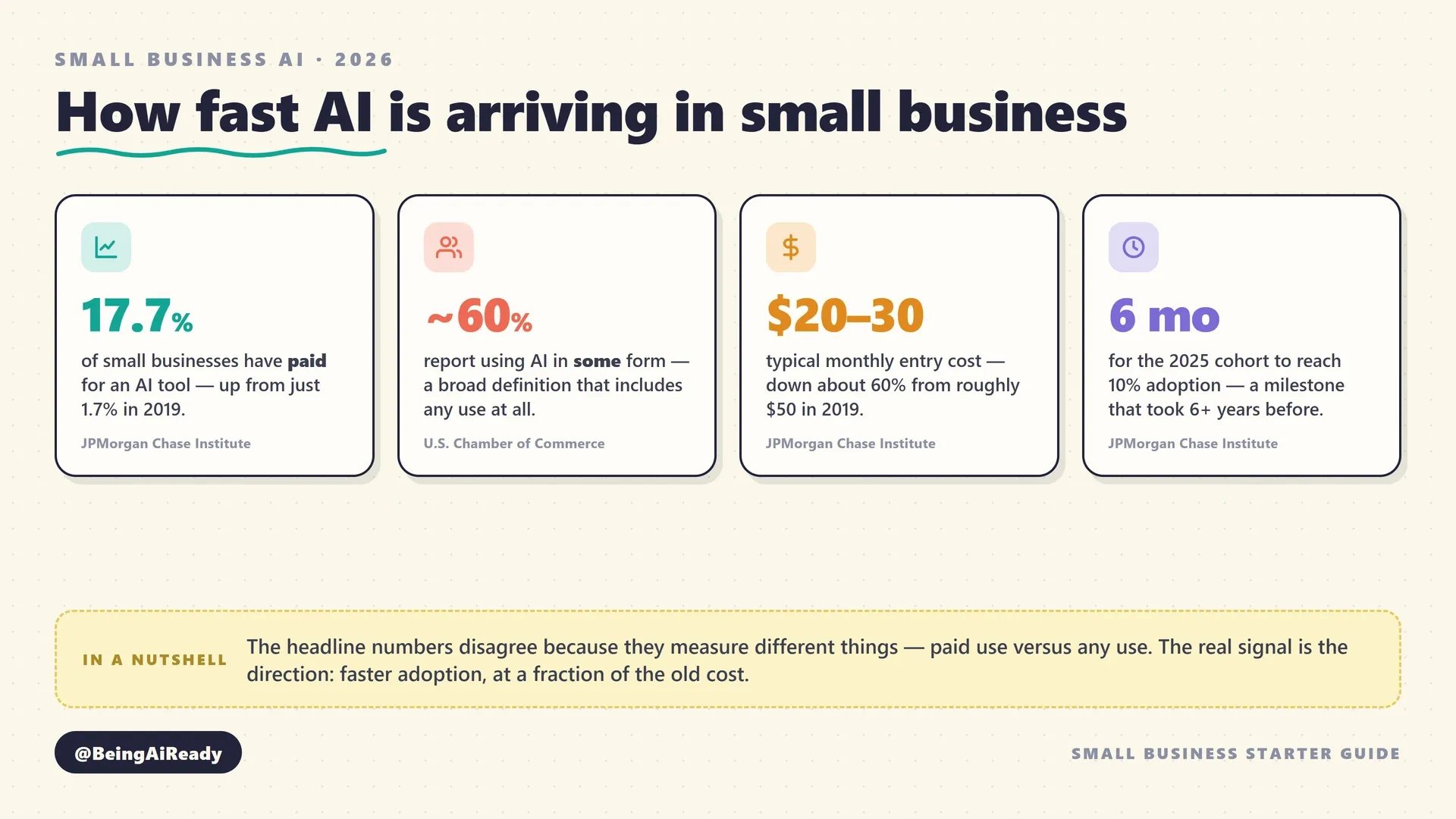
Two details in that data matter more than the top-line percentage. The first is speed. The JPMorgan Chase Institute found that the businesses adopting AI in 2025 reached a 10% adoption rate in about six months — a milestone the 2019 cohort took more than six years to hit. Whatever your instinct about whether this is a fad, the pace at which ordinary businesses are picking it up is not a fad’s pace. The second is cost. Over the same period, the typical entry price fell from roughly $50 a month to $20–30 a month. The thing that was expensive and experimental a few years ago is now cheap and routine, which is precisely why it’s showing up in dentists’ offices and landscaping companies rather than just tech firms.
None of this means you’re “behind” if you haven’t started — that’s the fear-based framing, and it’s not helpful. What it means is simpler: the tools have quietly reached the point where a small business that uses them well saves real time on real tasks, and the cost of finding out whether that’s true for you has dropped to roughly the price of one lunch a month. That’s a very different proposition from the breathless one, and a much easier one to act on calmly.
There’s one more finding worth holding onto, because it should shape your expectations in the right direction. When the U.S. Chamber of Commerce Foundation looked at what small business workers actually do with AI, the answer was overwhelmingly mundane and reassuring: most use it to boost their own productivity, not to automate jobs away. The most common uses were personal productivity tasks — drafting, summarizing, brainstorming — and the majority reinvested the time they saved into doing more or better work. This is the realistic picture of AI in a small business: not a robot workforce, but a set of tools that shave the friction off the parts of the day you already dread. If that sounds unglamorous, good. Unglamorous and reliable is exactly what you want from a business tool.
The one mistake almost everyone makes
Before any tool talk, the single most valuable habit: start with the job, not the tool. The most common and expensive mistake small business owners make with AI is to start from the wrong end — they hear a tool is amazing, sign up, poke at it for twenty minutes with no particular task in mind, decide it’s either magic or useless, and either over-invest or give up. Both outcomes come from the same error: choosing a tool before defining a job.
The fix is almost embarrassingly simple. Instead of asking “what can this AI do?”, ask “what do I do every week that I dislike, that eats my time, and that mostly involves words, information, or repetition?” That question points straight at the tasks where today’s AI is actually strong. Writing the same kinds of emails over and over. Turning a rambling voice memo into a clean document. Answering the same five customer questions for the hundredth time. Summarizing a long PDF you don’t have time to read. Drafting social posts you keep putting off. Reformatting messy data. These are unglamorous, repetitive, language-heavy chores — and they’re precisely what these tools do well.
This “job first” discipline is worth a guide of its own, and we’ve written one: how to choose the right AI tool walks through defining what “done” looks like before you compare a single product. The short version, tuned for a small business: pick the one recurring task that costs you the most time or the most dread this month, and make that your first experiment. Not “adopt AI.” Just “get help with this one annoying thing.” Everything else in this guide builds on that one honest starting point, because a tool matched to a real, specific job proves its worth in an afternoon — while a tool adopted in the abstract proves nothing and quietly becomes another unused subscription.
Where AI actually earns its place in a small business
AI helps a small business in the places where the work is repetitive, language-heavy, or informational — and helps far less where the work is physical, relational, or requires accountable judgment. That single distinction predicts, better than any tool review, where you’ll get value. Below are the areas where small businesses reliably see a return, each with concrete examples and honest limits. You will not use all of them; the point is to recognize which map onto your particular business.
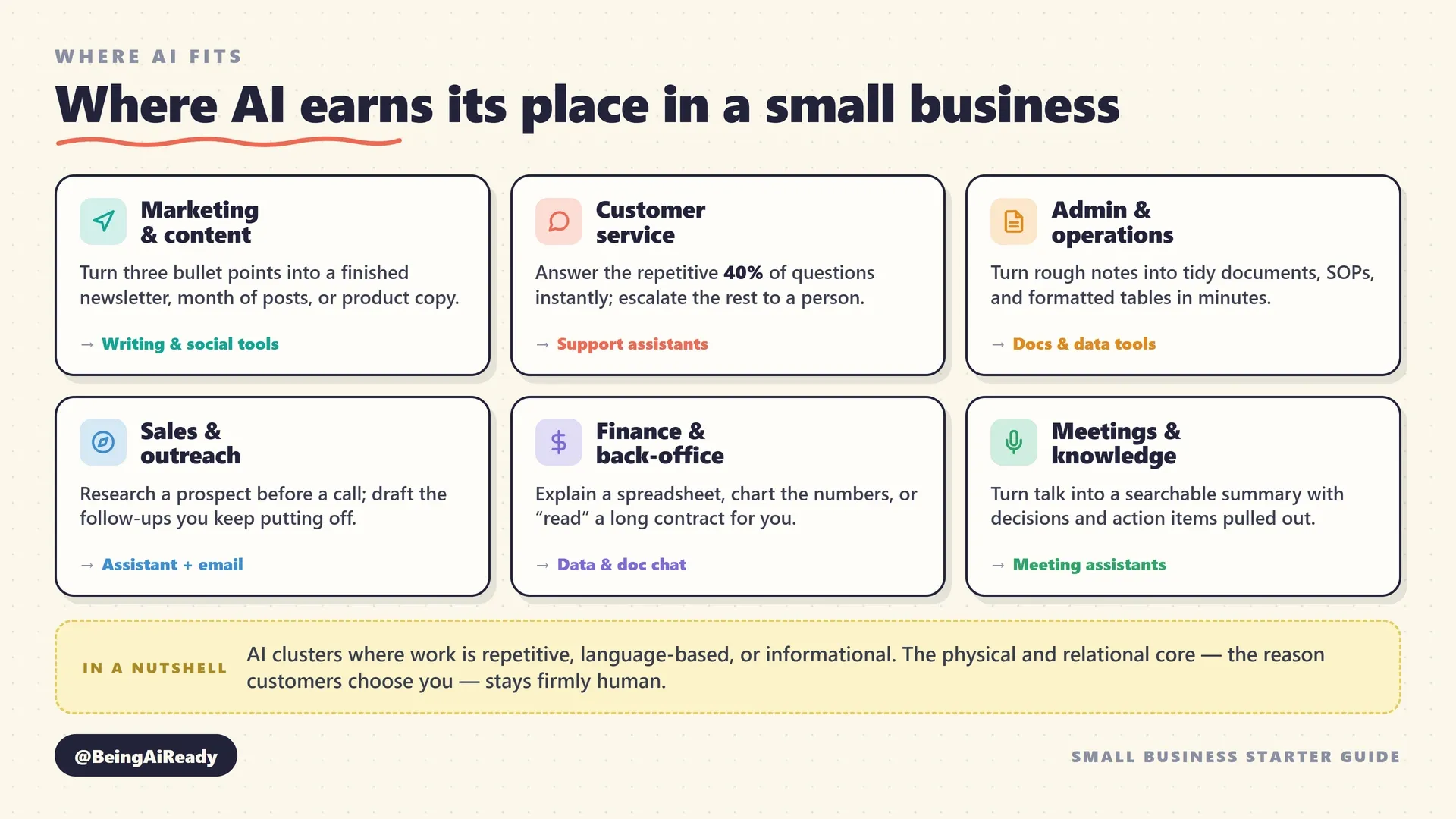
Here’s the same territory as a quick reference, mapping the everyday job to the kind of tool that does it, so you can jump straight to the category that fits your business:
| The job you actually have | What AI does with it | Where to look |
|---|---|---|
| Draft and polish emails, posts, pages | Turns rough notes into clean copy in your voice | AI writing tools |
| General help: brainstorm, explain, summarize | One assistant for research, drafting, analysis | AI chat assistants |
| Answer repetitive customer questions | Handles common queries, escalates the rest | AI customer support |
| Post consistently on social media | Drafts, schedules, and repurposes content | AI social media tools |
| Get through a crowded inbox | Drafts replies, summarizes long threads | AI email assistants |
| Capture what was decided in meetings | Records, transcribes, and summarizes with action items | AI meeting assistants |
| Make sense of a spreadsheet | Explains, analyzes, and charts your data | AI data analysis |
| Connect apps and remove manual steps | Automates repetitive multi-step busywork | AI automation |
| Produce images and simple graphics | Generates on-brand visuals without a designer | AI image generation |
| ”Read” a long document for you | Chat with a PDF or contract to find answers | AI document chat |
Marketing and content: the fastest, safest first win
For most small businesses, marketing is where AI pays off first, because it’s the area with the most repetitive writing and the lowest risk if a draft needs another pass. A general assistant will turn three bullet points into a serviceable newsletter, rewrite a stiff product description so it sounds human, draft a month of social captions from a single blog post, or spin one customer testimonial into copy for your website, an email, and an Instagram post. None of this replaces a real marketing sense — knowing your customers, having a point of view — but it removes the blank-page friction that keeps most owners from marketing consistently at all.
The realistic workflow looks like this: you bring the substance (what you’re promoting, what makes it good, who it’s for), the AI brings the first draft, and you edit it back into your own voice. The mistake is skipping that last step. AI-written marketing that goes out unedited has a recognizable flatness — vague enthusiasm, no specifics, the same three adjectives everyone else uses. The value isn’t “AI writes my marketing”; it’s “AI gets me to a draft in two minutes so I’ll actually finish it.” For the mechanics, dedicated AI writing tools and social media tools add scheduling and brand controls, but a general assistant is where to start. If search traffic matters to you, AI SEO tools can help with keywords and briefs — though tread carefully, since search engines increasingly penalize mass-produced AI content, and thin, generic pages hurt more than they help.
Customer service and support: handle the repetitive 40%, keep the human 60%
Customer support is the area with the clearest, most-measured returns — and the one where the “keep a human in the loop” rule matters most. A large share of the questions any small business fields are the same handful, asked again and again: your hours, your prices, your return policy, order status, “do you do X,” “are you open on Sundays.” AI is genuinely good at handling exactly that repetitive tier — an AI support tool or chatbot on your site can answer the routine questions instantly, day and night, and hand off anything unusual to you. That frees your attention for the conversations that actually need a person: the upset customer, the complicated request, the judgment call.
Two cautions, both important. First, a support bot is only as good as the information you give it — feed it your real policies and FAQs, and test it with the awkward questions before you trust it in front of customers, because a confidently wrong answer about your refund policy is worse than no bot at all. Second, be honest with customers that they’re talking to an automated assistant, and make the “talk to a human” path obvious and short. The businesses that get this wrong are the ones that use a bot as a wall to keep customers out; the ones that get it right use it as a fast lane for simple questions and a smooth handoff for everything else. Done well, it’s the difference between answering the same question at 9pm on a Saturday and having it already handled.
Admin, operations, and the back office
This is the quiet, unglamorous category where small businesses often save the most time, precisely because admin is so language-heavy and repetitive. AI can draft standard operating procedures from a rough description of how you do something, turn a messy list into a formatted table, write the first version of a policy or a client onboarding email, summarize a long contract so you know which clauses to actually read (then send it to a lawyer, not the AI, for the real review), and reformat information from one shape into another endlessly. If you’ve ever spent an hour turning notes into a tidy document, that’s an hour AI can cut to ten minutes.
A few specific back-office wins worth knowing about: you can chat with your documents — upload a supplier contract, an insurance policy, or a dense government form and ask it questions in plain English instead of reading forty pages to find one answer. You can point an assistant at a spreadsheet and ask it to explain what the numbers are doing or build a chart, via AI data analysis tools or the AI features now built into the spreadsheet apps you already use. And for the truly repetitive multi-app chores — copy this from the form into the CRM, then send that email, then update the sheet — no-code automation tools can wire the steps together so they happen without you. That last one has a learning curve, so it’s a “later” win, not a first-week one.
Sales and outreach
On the sales side, AI helps most with preparation and follow-through, not with the relationship itself. It can research a prospect before a call so you walk in informed, draft a personalized outreach email that doesn’t sound like a template, write follow-up messages you’d otherwise keep putting off, and turn your notes from a sales call into a clean summary and a proposal draft. For a small business where the owner is also the salesperson, this is mostly about removing the administrative drag that makes follow-up fall through the cracks — and follow-up, as every salesperson knows, is where most deals are actually won or lost.
The limit here is real and worth stating plainly: AI can help you prepare for and follow up on a relationship, but it can’t have the relationship. The trust that makes someone choose your small business over a bigger competitor is built in the actual conversation, and outsourcing that to a bot is both obvious to the customer and self-defeating. Use AI to show up more prepared and follow up more reliably; keep the human part human.
Meetings, notes, and institutional memory
If your business runs on meetings, calls, or consultations, AI meeting assistants and transcription tools are among the highest-leverage tools available, because they solve a problem every small business has: things get decided in conversation and then forgotten. These tools join or record a meeting, produce a searchable transcript, and generate a summary with the decisions and action items pulled out. For a contractor doing site visits, a consultant taking client calls, or a founder in back-to-back meetings, this converts talk into a written record automatically — no more “what did we agree on again?” a week later.
One important courtesy and, in many places, legal requirement: tell people when a conversation is being recorded, and check the consent rules where you operate, because recording laws vary by region and getting this wrong is a genuine problem, not a formality. Handled openly, meeting AI is a small feature that quietly upgrades your whole business’s memory.
Where AI does not belong yet
Just as useful as knowing where AI helps is knowing where it doesn’t, so you don’t waste money forcing it. AI is weak — sometimes dangerously so — anywhere the work is physical (it can’t fix a pipe, plate a dish, or shake a hand), anywhere it requires accountable professional judgment (a doctor’s diagnosis, a lawyer’s advice, an accountant’s sign-off — AI can assist the professional but never replace the accountable human), and anywhere a wrong answer delivered confidently causes real harm. It’s also a poor fit for anything requiring truly current, specific facts about your business or the world unless you’ve explicitly given it that information, because on its own it doesn’t know your prices or today’s news — it predicts plausible text. Match the tool to the tasks where being fast-but-fallible is fine, and keep it away from the tasks where being confidently wrong is expensive.
What this looks like for five real businesses
The categories above are useful, but abstract, so here’s the same thinking run through five genuinely different small businesses. Notice that the process is identical every time — find the repetitive, language-heavy chore and hand it a general assistant first — even though the specific wins differ. If none of these is exactly your business, the closest one will still show you the pattern.
The dental practice. The front desk answers the same questions all day: opening hours, whether you take a particular insurance, how to prepare for a cleaning, what to do about a lost filling over the weekend. A simple customer support assistant on the website, fed the practice’s real FAQs, handles the routine ones instantly and books the rest for a callback, freeing the front desk for the patients standing in front of them. Behind the scenes, a general assistant drafts the recall reminders, the post-treatment care instructions, and the monthly patient newsletter nobody had time to write before. What stays human: every word of clinical judgment, and the reassuring conversation with a nervous patient. The AI touches the admin around the care, never the care itself.
The plumbing and trades business. Here the core work is physical and AI can’t touch it — which is exactly why the owner was skeptical, and exactly why the wins are in the paperwork that steals evenings. After a site visit, the owner records a two-minute voice memo describing the job, and a general assistant turns it into a tidy written quote and a scope-of-work summary for the customer. Meeting and transcription tools capture what was agreed on a call so there’s a record when a dispute arises. The same assistant drafts the “sorry we’re running late” texts, the review-request follow-ups, and the standard responses to the fifteenth “do you cover my area?” enquiry this week. The pipe still gets fixed by a person; the two hours of admin that used to follow each job shrinks to twenty minutes.
The café with a catering side. The day-to-day café runs on people and food — nothing for AI there. But the catering side lives and dies on marketing and quotes, and that’s where a couple of hours a week were disappearing. A general assistant plus a social media tool turns one photo of a finished catering spread into a week of posts, drafts the seasonal menu descriptions, and writes the email replies to catering enquiries in a warm, consistent voice. AI image generation mocks up a simple flyer for a holiday special without hiring a designer. The owner brings the taste and the actual food; the AI removes the marketing friction that kept the profitable side of the business under-promoted.
The solo marketing freelancer. This is a case where AI is central rather than peripheral, because the work itself is language and information. A general assistant is the freelancer’s whole back office: it turns a client’s rough brief into a first draft, repurposes one long piece into posts for three platforms, drafts the boring client update emails, and summarizes research so a proposal takes an afternoon instead of a day. But the honest tension here is real — the freelancer’s value is their voice and judgment, so the discipline is to use AI for the mechanical 70% and never let it flatten the 30% that clients actually pay for. Used well, it lets one person deliver like a small team. Used lazily, it produces the generic AI sludge that gets a freelancer fired.
The bookkeeping and accounting firm. This one demands the sharpest line between “assist” and “replace,” because the stakes of a confident wrong answer are high. AI is genuinely useful for the language-heavy parts: drafting client onboarding documents, explaining a complex tax concept in plain English for a client email, summarizing a long piece of guidance, and chatting with a dense document to find the relevant clause fast. It is emphatically not the accountable party for any number, filing, or piece of advice — a professional checks and signs off everything, and confidential client financials go only into a properly secured, paid tier, never a free consumer one. Here AI speeds up the professional; it never becomes the professional.
Five businesses, one method. In every case the owner started with a specific recurring chore, handed it to a general assistant first, kept the human where judgment and relationships live, and guarded the confidential data. That repeatable pattern matters far more than any specific tool, because the tools will change and the pattern won’t.
A 30-day starter plan you can actually follow
The best way to adopt AI in a small business is one small task at a time, over about a month, with nothing to install and no upfront spend. The plan below is deliberately gentle — an hour or two a week, fit around real work — because the goal isn’t to “transform” anything; it’s to build the habit and prove the value on your own tasks before you spend a cent. Follow it loosely; the sequence matters more than the exact days.
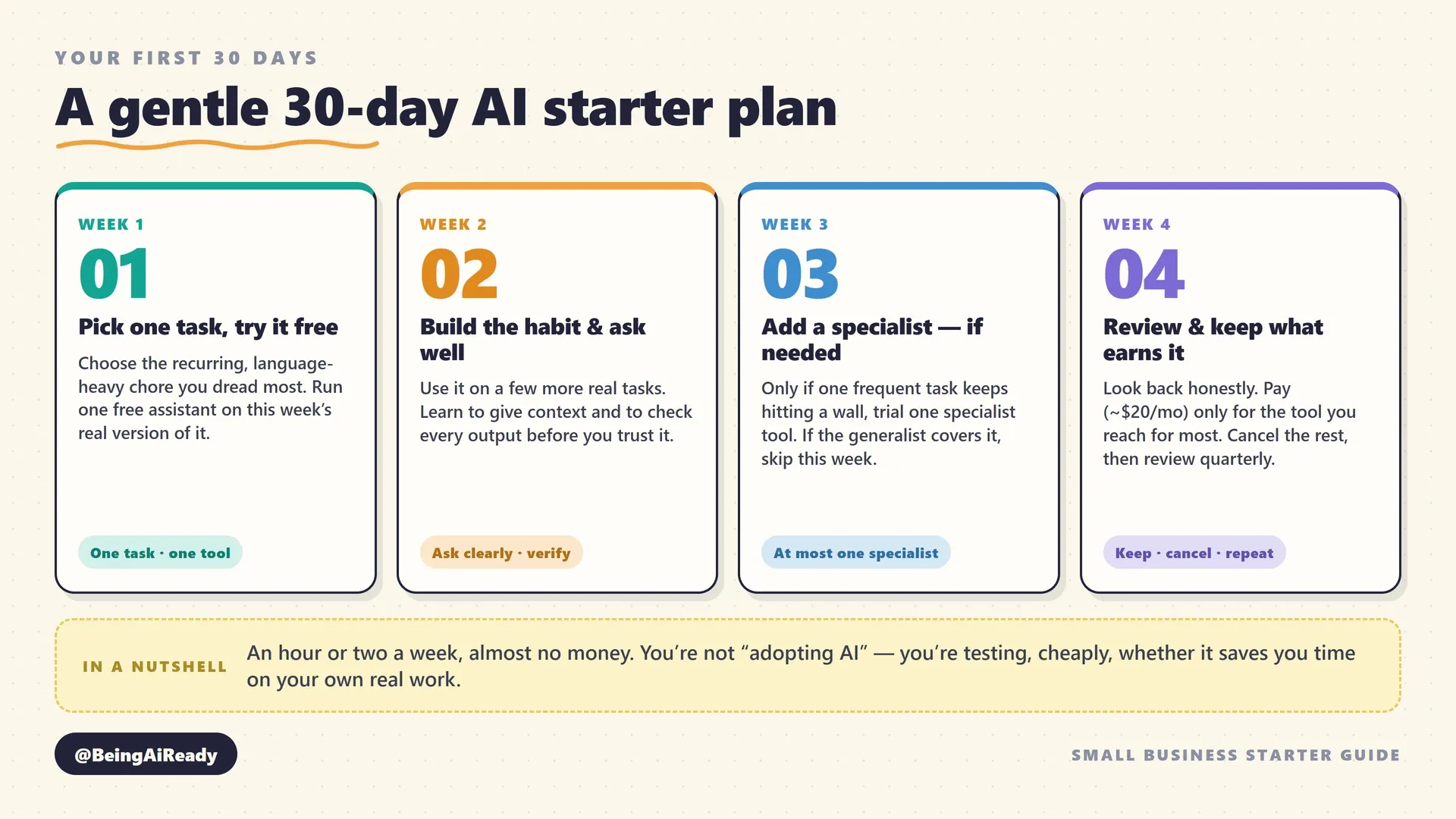
Week 1 — Pick one task and try it for free. Choose the single recurring, language-heavy task you identified earlier — the emails, the posts, the summaries, whichever you dread most. Sign up for the free tier of one general assistant (ChatGPT, Claude, or Gemini — any of the three is fine to start). Then use it on that one real task, this week’s actual version of it, not a test. Notice how long it took versus doing it by hand, and how much editing the result needed. That’s it. One task, one tool, one week. Resist the urge to sign up for five tools at once; you’re building a habit, not a stack.
Week 2 — Build the habit and learn to ask well. Now use that same assistant on two or three more real tasks as they come up during your normal week. The skill you’re developing is describing what you want clearly — the difference between a vague request and a good one is the difference between a useless answer and a genuinely helpful one. A little prompting technique for non-technical people goes a long way: give context (who you are, who it’s for), be specific about the output you want, and show an example if you have one. Also start building the verification habit now, while the stakes are low, so it’s automatic later: glance over every output for anything that looks off, and never publish or send a fact you haven’t checked.
Week 3 — Add one specialist, only if a task demands it. By now you’ll have a feel for where the general assistant is great and where it’s clumsy. If — and only if — one frequent task keeps hitting a wall (you need real transcription, proper images, or an always-on support bot), add exactly one specialist tool for that job and trial its free version. If the general assistant is covering everything you need, skip this week entirely; there is no prize for using more tools. Most very small businesses genuinely don’t need more than the general assistant plus, at most, one specialist in the first month.
Week 4 — Review honestly and decide what to keep. Look back at the month with a cold eye. Which tasks did AI genuinely make faster or better? Where did it waste your time or need so much correction it wasn’t worth it? Keep the tools that clearly earned their place, and only now consider paying for one — the standard ~$20/month plan, month-to-month, for the one tool you reach for most. Cancel or ignore the rest. Then set a recurring reminder to run this same fifteen-minute review every quarter, because the tools change fast and so do your needs. That review habit, more than any single tool, is what keeps AI a net gain rather than a drawer full of forgotten subscriptions.
The whole point of stretching this over a month is that it costs you almost nothing — no money, an hour or two a week — while giving you real evidence about whether and where AI helps your business specifically. That evidence is worth far more than any listicle, because it’s about your actual work, not a stranger’s.
Choosing your first tools without drowning
The right AI toolkit for most small businesses is smaller than the internet will lead you to believe: one strong general-purpose assistant, plus at most one or two specialists for tasks you do often. That’s it. The instinct in a market flooded with options is to collect tools; the discipline that actually pays off is to keep only the ones doing genuinely different jobs. Every tool you add is another subscription, another login, another thing to learn and eventually cancel.
Start with a general-purpose assistant, and give it a real chance before specializing. ChatGPT, Claude, and Gemini are the three main options, and for a small business getting started, the differences between them matter far less than picking one and actually learning it. A modern general assistant can now draft your writing, answer research questions, analyze a spreadsheet, summarize a document, help with basic code, and generate images — all from one roughly $20/month subscription (with a capable free tier to start). For the majority of small businesses, that single tool covers a genuinely surprising amount of ground, and reaching for specialists before you’ve exhausted the generalist is the classic way to over-buy.
Add a specialist only when you feel real, repeated friction. The signals that justify a dedicated tool are specific and recognizable: you do a task so often that small improvements compound (high volume), or the job needs a quality or format the general tool only approximates — accurate long-form transcription, production-ready image generation, an always-on customer support bot, or automation that connects your apps. If none of those apply, you don’t need the specialist yet, no matter how good its demo looks. Our full buyer’s framework for choosing an AI tool goes deep on this, but the small-business shortcut is: default to the tool you already have, and let genuine friction — not novelty — be the only thing that adds a new one.
A quick word on the fear of choosing “wrong”: for a small business, it barely matters at the start, because switching costs are low and free tiers let you test before you commit. You are not making a permanent decision; you’re running a cheap experiment. The real risk isn’t picking the second-best tool — it’s paralysis, spending so long comparing options that you never actually start. Pick one general assistant this week, use it on real work, and let experience — not reviews — tell you what, if anything, you need next.
If you have a team: rolling it out without chaos
If your small business has even a handful of employees, there’s a fact you should sit with before you plan anything: some of your people are almost certainly already using AI at work, whether or not you’ve said a word about it. The U.S. Chamber of Commerce Foundation found roughly half of small business workers already use AI on the job — and much of that is happening on personal accounts, with no guidance, which the security world calls “shadow AI.” The question isn’t whether to allow it. It’s whether it happens deliberately or accidentally.
Deliberate beats accidental for one concrete reason: risk. An employee pasting a customer list or a confidential contract into a free consumer tool to “just get some help with it” is a data problem you’ll only discover after it’s happened. A short, clear policy prevents most of that, and it doesn’t need a lawyer or a ten-page document. A single page covering three things is plenty for most small businesses: which tools are approved, what data must never be pasted into them (the red-list from the risks section — customer records, financials, anything confidential), and the rule that a human checks anything AI produces before it goes to a customer. Written plainly and actually shared, that page removes the fear and the guesswork that drive people to do risky things quietly.
Beyond the policy, a few habits make team rollout calm rather than chaotic. Make it permission, not pressure — the goal is to help people work better, and framing AI as a surveillance or headcount threat guarantees resistance and secrecy. Let your naturally curious people lead — in every small team someone is already enthusiastic; let them find the genuinely useful workflows and show the others, which beats any top-down training. Share what works in plain terms — a two-line “here’s a prompt that saved me an hour on invoices” spreads faster and sticks better than a formal session. And keep the human-judgment line explicit, so nobody assumes AI output is pre-approved. The deeper version of all this — the etiquette, the boundaries, the “don’t get into trouble” specifics — is covered in using AI at work without getting into trouble, which is worth sharing with the whole team.
One reassurance for you and for them, grounded in the same survey data: the evidence so far is that small business workers use AI to do their existing jobs better, not to eliminate the jobs — most reinvest the time saved into higher-quality work. If you’re weighing the bigger anxieties in the background, whether AI will take jobs and which AI skills genuinely matter now are worth reading. For a small business, the realistic framing to give your team is the honest one: this is a tool that removes the tedious parts of your work so you can spend more time on the parts that need a person. Said clearly and backed by a sane policy, that turns AI from a source of quiet anxiety into a shared, practical upgrade.
What AI actually costs, honestly
For a very small business, the realistic first-year AI budget is somewhere between zero and the cost of a couple of streaming subscriptions — not a platform, not a consultant, not a transformation project. The pricing has genuinely come down, and the free tiers are genuinely useful, which together mean the financial risk of starting is close to nothing. But “cheap to start” hides a few costs worth naming, because the subscriptions are also genuinely easy to accumulate and forget.
Here’s the honest shape of what things cost, from free to a small paid stack:
| What you’re paying for | Typical cost (USD) | Who it’s right for |
|---|---|---|
| Free tier of a general assistant | $0 | Everyone, to start and to test fit |
| One paid general assistant (individual) | ~$20/month per person | Most small businesses, once it’s earning its place |
| One added specialist tool | ~$10–40/month | A frequent task the generalist can’t do well |
| A small paid stack (assistant + 1–2 specialists) | ~$40–80/month total | An established small business with a few regular AI jobs |
The costs that don’t show up on that table are the ones to watch. Learning time is real — budget a few hours to get genuinely comfortable, not because it’s hard but because rushing it is how people conclude “AI doesn’t work” after a bad twenty minutes. Subscription creep is the big one: because signing up takes ninety seconds and cancelling requires remembering you signed up, AI subscriptions pile up quietly, and the most common source of wasted AI spend isn’t an expensive tool — it’s three cheap ones nobody uses anymore. And the hidden cost of the free tier cuts the other way: some free tiers are genuinely useful indefinitely, while others are a demo designed to push you to upgrade the moment you do anything serious — so know which kind you’re on before you build a habit on it.
The reassuring context, from the JPMorgan Chase Institute data cited earlier, is that entry costs have fallen by roughly 60% since 2019 — from about $50/month to $20–30/month — which is a big part of why small businesses can now afford to experiment at all. The discipline that keeps this cheap is boring and effective: prefer month-to-month over annual until a tool has earned its place, use free tiers to validate before paying, and put a quarterly subscription review on the calendar. Buy for the actual bottleneck costing you time, never for the feature list — the same principle behind building an AI stack without wasting money.
Getting real results: the two skills that matter
Two small skills separate people who get real value from AI from people who bounce off it: describing what you want clearly, and checking what you get back. Neither is technical, both take a few hours of practice to get comfortable with, and together they account for most of the difference between “this is genuinely useful” and “this is overhyped garbage.” The tool is the same; the skill is what changes the result.
Skill one: asking well. The quality of what you get out of an AI is mostly determined by the quality of what you put in, and the most common reason people get bland, useless answers is that they asked a bland, vague question. The fix isn’t magic phrasing — it’s giving the tool the context a competent human helper would need. Who are you, who is this for, what’s the goal, what does good look like, and — if you have one — an example to match. “Write a marketing email” gets you generic sludge. “Write a friendly, 120-word email to past customers of my dog-grooming business announcing a 20%-off loyalty discount for March, warm but not salesy, here’s one we sent before that worked” gets you something you can actually use. A little structure goes a long way; our guide to prompting for non-technical people covers the handful of patterns worth learning.
Skill two: verifying before you trust. This is the non-negotiable one, and the habit that keeps you out of trouble. Because AI produces confident, plausible text whether or not it’s correct, you have to treat its output as a well-informed draft from an assistant who is sometimes wrong — useful, but always checked before it goes anywhere that matters. Never send a client a number, a date, a legal detail, or a factual claim that came from an AI without confirming it yourself. Our guide to fact-checking AI answers lays out a simple routine, and it’s worth understanding why AI makes things up so the habit feels natural rather than paranoid. The rule of thumb: the higher the stakes of being wrong, the more you verify — a brainstorm needs almost none, a customer-facing price or policy needs all of it.
Get these two skills right and everything else about AI becomes easier, because you’ll be feeding the tools well and catching their mistakes before they cost you anything. Get them wrong and no tool, however advanced, will save you — you’ll either get mediocre output or, worse, confidently publish something false. They’re worth the few hours far more than any specific tool is worth its subscription.
The risks nobody puts on the sales page
AI’s real risks for a small business are mundane and manageable — mostly about data, accuracy, and trust — but they’re genuine, and the sales pages won’t mention them. The good news is that a handful of simple habits neutralize almost all of them. The point of this section isn’t to scare you off; it’s to let you use these tools confidently because you know where the edges are. A guide to using AI at work without getting into trouble covers this in more depth, but here’s what matters most for a small business owner.
Data privacy and confidentiality — the big one. When you paste something into an AI tool, you may be sending it to the vendor’s servers, and depending on the tool and tier, it may be retained and even used to train future versions of the model. For a lot of what you’ll do, that’s fine. But for confidential material — customer records, employee information, financials, unreleased plans, anything covered by a contract or a privacy law — it’s a real risk you have to manage deliberately. The rule below sorts most of it out.
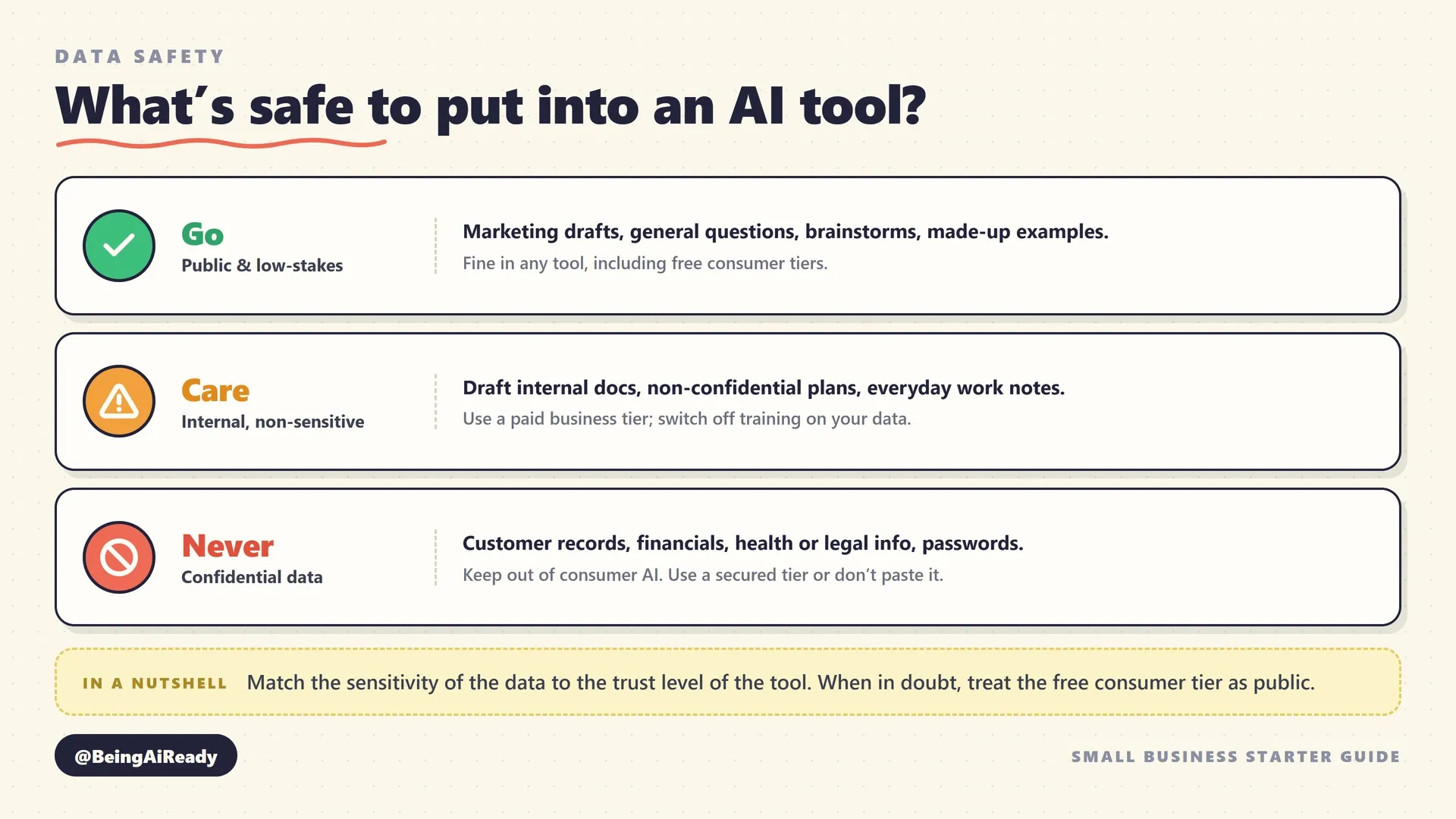
The practical rule is to match the sensitivity of the data to the trust level of the tool. Public or low-stakes content — marketing drafts, general questions, made-up examples — is fine in any tool, including free consumer tiers. Genuinely confidential data should either stay out of AI entirely or go only into a paid business/enterprise tier with clear terms that say it won’t be used for training, with that setting switched on where it exists. And if you handle regulated data — health information, financial records, anything under a privacy law like GDPR — treat data handling as a hard requirement, check where the data is stored, and when in doubt, keep it out. The single safest habit: assume anything you type into a free consumer AI tool could become public, and behave accordingly.
Accuracy and hallucination. As covered earlier, AI states false things with total confidence, and for a business this isn’t abstract — professionals have been formally sanctioned for submitting AI-generated work containing invented facts and fake citations they never checked. For you, the exposure is smaller but real: a wrong price quoted to a customer, a made-up policy detail, an incorrect figure in a proposal. The mitigation is the verification habit from the previous section: nothing factual, customer-facing, or consequential goes out without a human check. Treat every AI output as a draft, never a final answer.
Legal, compliance, and the “not a professional” line. AI is a research assistant, not a lawyer, accountant, or doctor, and treating its output as professional advice is a genuine way to get hurt. It’s great for helping you understand a contract well enough to ask your lawyer the right questions; it is not a substitute for the lawyer. Two more legal wrinkles worth knowing: content you generate with AI may have murky copyright status, so don’t assume you own an AI-generated logo the way you’d own a designed one; and rules on recording, data, and AI disclosure vary by region and are changing quickly, so check what applies where you operate rather than assuming.
Over-reliance and the loss of your own edge. A subtler, longer-term risk: if AI does all the first-draft thinking, your own skills — and your business’s distinctive voice — can quietly atrophy. The businesses that use AI best treat it as a tool that speeds up their thinking, not one that replaces it; they bring the judgment, the taste, and the point of view, and let AI handle the mechanical parts. Keep yourself in the loop not just to catch errors, but to stay the author of your own work.
Customer trust and disclosure. Customers increasingly know what AI-generated content looks like, and being caught passing off obviously automated, impersonal work as genuine care can cost you the exact trust that makes a small business worth choosing. Use AI to be more responsive and consistent, not to become impersonal. Where a customer might reasonably want to know they’re dealing with a bot rather than a person — a support chat, for instance — tell them. Honesty here is both the ethical call and the commercially smart one, because trust, once lost, is far more expensive to rebuild than any tool saves.
None of these risks should stop you from using AI — they’re all manageable with habits any owner can adopt in an afternoon. The businesses that get burned are the ones that treat AI as infallible, feed it data they shouldn’t, and publish its output unchecked. Avoid those three mistakes and you’ve avoided almost all of the real danger.
Measuring whether it’s actually working
The only honest measure of whether AI is helping your business is time and quality on real tasks — not how impressive the tool feels, and not how much everyone says you should be using it. It’s easy to feel productive with a shiny new tool while it quietly saves you nothing; the discipline is to check, simply and periodically, against reality.
The method is deliberately low-effort, because a measurement system you won’t maintain is useless. Before you adopt a tool for a task, note roughly how long that task takes you by hand and how happy you are with the result — the weekly newsletter takes 90 minutes, answering common customer emails eats an hour a day, reconciling receipts takes a painful Sunday afternoon. After a few weeks of using AI for it, check the same task again. Is it clearly faster? Is the quality as good or better? Is the time you saved going into something more valuable, or just evaporating? If a tool isn’t obviously winning on that simple test, it isn’t earning its subscription, and the right move is to cancel it without sentiment.
Two traps to watch for. The first is the tool that’s fun but not useful — genuinely enjoyable to play with, but not actually saving time on anything that matters; these are the easiest subscriptions to keep paying for and the least justified. The second is counting time saved that you don’t actually recapture — if AI saves you two hours a week and those two hours vanish into busywork, the real gain is smaller than it looks. The businesses that get durable value from AI are the ones that deliberately reinvest the saved time into higher-value work, which, encouragingly, is exactly what most small business workers report doing. Tie your quarterly subscription review (from the 30-day plan) to this simple time-and-quality check, and you’ll keep the tools that pull their weight and shed the ones that don’t — which is the whole game.
When AI is the wrong answer
Sometimes the right, honest answer is that AI isn’t the tool for the job — and a guide that never says so isn’t being straight with you. Knowing when to not reach for AI is as valuable as knowing when to, because it saves you the wasted subscriptions and the frustration of forcing a tool onto a task it can’t do.
Skip AI, or keep it firmly in a supporting role, when: the task is genuinely one-off and small (don’t stand up a workflow to do something once — just do it); the work is physical or hands-on (AI can help you schedule the plumbing job and write the invoice, but it can’t fix the pipe); the stakes of a confident wrong answer are high and unmonitored (medical, legal, financial, safety — AI can assist a qualified human but must never be the accountable one); the value you provide is the human relationship (therapy, coaching, high-trust advisory, hospitality — customers are paying for you, and they can tell); or the data involved is too sensitive to risk and there’s no properly secured tier available. In all of these, forcing AI in doesn’t just fail to help — it can actively damage the thing that makes your business valuable.
There’s also a simpler version of “wrong answer”: when adopting AI would cost you more time and attention than the task it’s meant to save. For a solo business owner already stretched thin, the honest move is sometimes to not add another tool this quarter, and to revisit it when you have the bandwidth to learn it properly. AI is a tool, not an obligation. The goal is a calmer, more productive business — and if a particular AI adoption doesn’t serve that goal, not doing it is a perfectly good decision.
The bottom line
Strip away the hype and the fear, and AI for a small business comes down to something quite manageable: a set of cheap, capable tools that are genuinely good at the repetitive, language-heavy, informational parts of your work, and genuinely bad at the physical, relational, and high-judgment parts that are usually the heart of why customers choose you. Used for the first and kept away from the second, it saves real time at low cost and low risk. Used the way the hype implies — as an infallible expert you can trust blindly — it will eventually embarrass you. The whole skill is keeping those two straight.
So start small and start honestly. Pick the one task you dread most that involves words or information, try a free general assistant on it this week, and judge the result on your own real work rather than anyone’s demo. Learn to ask clearly and to check before you trust. Add a tool only when a real, repeated need demands it, keep your stack small, protect your confidential data, and review every subscription quarterly against the simple test of whether it’s actually saving you time. Do that, and you’ll capture the boring, compounding, few-hours-a-week value that’s genuinely available now — without the wasted money, the privacy mistakes, or the anxiety that you’re falling behind.
You’re not falling behind. The tools will keep changing, and most of the breathless coverage will keep being written for people who aren’t you. What lasts is the calm, practical habit of matching a real job to the tool that actually does it — and, just as often, deciding you already have what you need. When you’re ready to go from this overview to specifics, the AI tool directory is the other half of this guide: the same jobs, organized by category, with the individual tools compared on the criteria that actually matter. This is how to think about AI in a small business. The directory is what to reach for. Use them together, and “should my business be using AI?” stops being an anxious question and becomes a series of small, cheap, sensible experiments — which is exactly what it should have been all along.
Frequently asked questions
Do I need to be technical to use AI in my small business?
No. The tools that matter most for a small business -- a general assistant like ChatGPT, Claude, or Gemini, plus a few specialists -- work through plain conversation in a browser or phone app. If you can write an email describing what you need, you can use them. The real skill isn't technical; it's learning to describe a task clearly and to check the output before you trust it. Both come with a few hours of honest practice, not a course.
How much does it cost a small business to get started with AI?
You can start for free and prove the value before paying anything. The main general assistants all have capable free tiers. When you're ready to commit, the standard paid plan is around $20 per month per person -- and entry costs have actually fallen, from roughly $50/month in 2019 to $20-30/month by 2025, according to the JPMorgan Chase Institute. A realistic first-year budget for a very small business is one or two paid seats, not a platform.
Is it safe to put my customer or business data into AI tools?
It depends entirely on the tool's tier and settings, so treat it deliberately. Assume anything typed into a consumer free tier could be retained and used to improve the model unless the vendor's current policy says otherwise. For anything confidential -- customer records, financials, unreleased work -- use a paid business tier with clear data terms, turn off training on your data where the setting exists, or don't paste it at all. Match the sensitivity of the data to the trust level of the tool.
Will AI replace my employees?
For most small businesses, the honest near-term answer is no -- it changes what people spend their time on rather than removing the people. Survey data backs this up: the U.S. Chamber of Commerce Foundation found that small business workers overwhelmingly use AI to boost their own productivity, not to automate jobs away, with most reinvesting the time saved into higher-quality work. AI is far better at handling the repetitive parts of a job than at replacing the judgment, relationships, and accountability a role actually needs.
What's the single best AI tool for a small business?
There isn't one, and chasing it is the most common way to waste money. The better question is 'best for which job.' For most small businesses the right starting point is one strong general-purpose assistant (ChatGPT, Claude, or Gemini) that covers writing, research, and analysis, then one or two specialists only for the tasks you do often -- transcription, image generation, or customer support automation. Start general, specialize only where you feel real, repeated friction.
How do I know if AI is actually saving my business money?
Measure time, not vibes. Before you adopt a tool, note roughly how long a specific recurring task takes -- writing the weekly newsletter, answering common customer questions, reconciling receipts. After a few weeks with the tool, measure the same task again. If it's not clearly faster or better on real work, the tool isn't earning its subscription, and you should cancel it. Review every AI subscription quarterly against that simple test.
Related articles
How to Choose the Right AI Tool: A Buyer's Framework
A calm, no-hype framework for choosing the right AI tool for any task: define the job, judge the real criteria, run a cheap trial, and avoid costly switching.
Best AI Coding Assistants for Beginners in 2026
A practical comparison of the best AI coding assistants for beginners, including GitHub Copilot, Replit, Cursor, Antigravity, Amazon Q, and JetBrains AI.
Best AI Meeting Assistants in 2026 (Ranked & Compared)
The best AI meeting assistants in 2026, ranked by notes, integrations, workflow automation, value, privacy controls, and fit for real teams.