
Prompt Engineering for Non-Technical People
In the spring of 2023, a job listing briefly convinced a lot of people that they’d missed the boat on the easiest high-paying career in tech. Anthropic, one of the leading AI labs, was hiring a “prompt engineer and librarian” for a salary that topped out around $335,000. Fortune ran a piece about how someone with a “hacker spirit” could earn over $300,000 writing instructions for chatbots. The internet did what the internet does. Within weeks there were bootcamps, $99 courses, and a small library of “10,000 ChatGPT prompts” ebooks promising that the right magic words were the difference between a novice and a six-figure professional.
Three years later, the headlines have flipped. Open a business publication in 2026 and you’ll find the opposite argument, often on the same website. Forbes ran “Why Prompt Engineering Isn’t The Most Valuable AI Skill In 2026.” The research firm Gartner started telling clients that “context engineering is in, prompt engineering is out.” Postings for the specific job title “prompt engineer” fell sharply. The tidy narrative now is that prompt engineering was a brief gold rush, the models got smart enough to not need it, and the whole thing is over.
Both of those stories are wrong in the same way. They both treat prompt engineering as an arcane technical specialty — either a lucrative one you should rush to learn, or an obsolete one you can safely ignore. It was never really either. Strip away the hype and the backlash, and what’s left is something much more ordinary and much more durable: the skill of telling a capable, literal, slightly strange kind of software exactly what you want, clearly enough that it can actually help you. That skill isn’t dying. It’s quietly becoming a normal part of how people write, research, plan, and do their jobs — which is exactly why it’s worth learning properly, especially if you don’t come from a technical background.
This guide is the version more of those $99 courses should have been. No magic words, no 10,000 templates, no promise that a secret phrase will transform your results. Just a clear explanation of what prompt engineering actually is, why it works, the handful of techniques that genuinely make a difference, and the ones that are a waste of your time.
Quick answer: Prompt engineering is the practice of writing clear, specific instructions that get useful results out of AI tools like ChatGPT, Claude, and Gemini. It requires no coding — it’s done entirely in plain language. The core of it is simple: describe what you want, who it’s for, and in what form, then refine based on what you get back. Frameworks and “magic phrases” are optional; being specific and willing to iterate is not.
Here’s what you’ll walk away knowing:
- Why prompt engineering has nothing to do with coding, and everything to do with a skill you probably already have.
- A mental model for what an AI model actually is — the single idea that makes every prompting tip suddenly make sense.
- The five ingredients of a strong prompt, and how to watch a useless prompt turn into a useful one.
- The handful of techniques that reliably improve results, backed by real research, not vibes.
- What’s genuinely a waste of effort: the myths, the “magic words,” and the mega-prompts you can safely ignore.
- Whether “prompt engineering is dead” is true, and what it means for you specifically.
What prompt engineering actually is (and isn’t)
Prompt engineering is the practice of phrasing your request to an AI system so it gives you what you actually need. A “prompt” is just the message you type in — the question, the instruction, the block of text you paste. Everything downstream of that message is shaped by it, so learning to write a better one is the highest-leverage thing most people can do to get more out of these tools.
The word “engineering” is doing a lot of unhelpful work in that phrase, and it’s the source of most of the confusion. It makes the whole thing sound like a technical discipline with a right answer, a syntax to memorize, and a certification at the end. It isn’t. There’s no code involved. There’s no special language. You are typing normal sentences in a text box. If you can write a clear brief for a freelancer, a clear email to a coworker, or a clear set of instructions for someone covering your job while you’re on holiday, you have the underlying skill already. What you’re missing is mostly an understanding of who — or rather what — you’re briefing.
That’s the part worth getting right, because it’s the difference between prompting that works and prompting that frustrates you. To write good instructions for a system, it helps to know how that system thinks. And an AI language model thinks nothing like a person, a search engine, or a database — even though it can convincingly imitate all three.
The one mental model that makes everything click
Here’s the idea that makes every prompting technique in this guide obvious rather than arbitrary. It’s worth reading slowly.
An AI chatbot doesn’t look up answers. It predicts text. Under the hood, a large language model — the technology behind ChatGPT, Claude, Gemini, and the rest — has read an enormous amount of writing and learned the statistical patterns in it. When you send it a prompt, it isn’t retrieving a stored answer from a filing cabinet. It’s generating a response one small piece at a time, each piece being its best guess at what word plausibly comes next, given everything you wrote and everything it absorbed in training. We’ve explained how large language models actually work in depth elsewhere, but that one sentence — it predicts plausible text, it doesn’t retrieve facts — is the load-bearing idea for everything that follows.
If you take that mechanism seriously, a specific and slightly odd personality falls out of it. The most useful way to hold it in your head is this: you’re not talking to a database or a person. You’re briefing an incredibly well-read, eager, literal-minded intern who has no memory of yesterday and will never ask you a clarifying question.
Sit with each part of that, because each part maps directly to a prompting habit:
- Incredibly well-read. It has absorbed a staggering range of material, so it can genuinely help with almost any topic. Don’t dumb your requests down.
- Eager. It will always try to give you something. It would rather produce a confident, fluent answer than admit it’s unsure — which is exactly why it sometimes invents things that aren’t true. Eagerness is useful and dangerous in the same breath.
- Literal-minded. It gives you what you asked for, not what you meant. Ask for “a short summary” and you have no grounds to complain when it’s three sentences and you wanted three paragraphs. The gap between what you said and what you wanted is where most bad results live.
- No memory of yesterday. Within one conversation it remembers what you’ve said. Start a new chat and it’s a blank slate — it doesn’t know you, your project, or last week’s discussion. Anything it needs to know, you have to supply.
- Never asks a clarifying question. A human intern who didn’t understand your request would ask. This one just guesses, fills the gap with something plausible, and hands it to you with total confidence. So the burden of removing ambiguity sits entirely on you, in the prompt.
Almost every “trick” of prompt engineering is really just one of these five facts, applied. Give examples? That’s because a literal-minded intern imitates a sample better than it interprets a description. Provide context? Because it has no memory of yesterday. Ask it to say when it’s unsure? Because eagerness makes it bluff. Keep this intern in your head and you can derive most of the good advice yourself.
There’s one more consequence of the “it predicts text” mechanism worth naming early, because it surprises people and quietly erodes their trust: you can send the exact same prompt twice and get two different answers. That’s not a malfunction. Because the model generates each response fresh, with a deliberate element of randomness baked in, the same input can lead to different outputs. A weak answer on the first try doesn’t mean your prompt failed — it might just mean you should ask again, or refine and ask again. This is the single biggest reason to treat prompting as a back-and-forth rather than a one-shot command, a point we’ll come back to.
The five ingredients of a strong prompt
Most weak prompts are weak in the same way: they’re a bare request floating in a vacuum. “Write a LinkedIn post about our new feature.” “Summarize this.” “Give me some ideas.” The intern can work with these, but it has to guess at everything you left out — the audience, the tone, the length, the purpose, what “good” looks like — and it will guess generically, because the safest bet for a text-predictor is the most average, most middle-of-the-road version of what you asked for.
A strong prompt removes the guessing. You don’t need all five of these every time — a quick question needs almost none of it — but for anything that matters, these are the ingredients that turn a generic answer into a useful one.
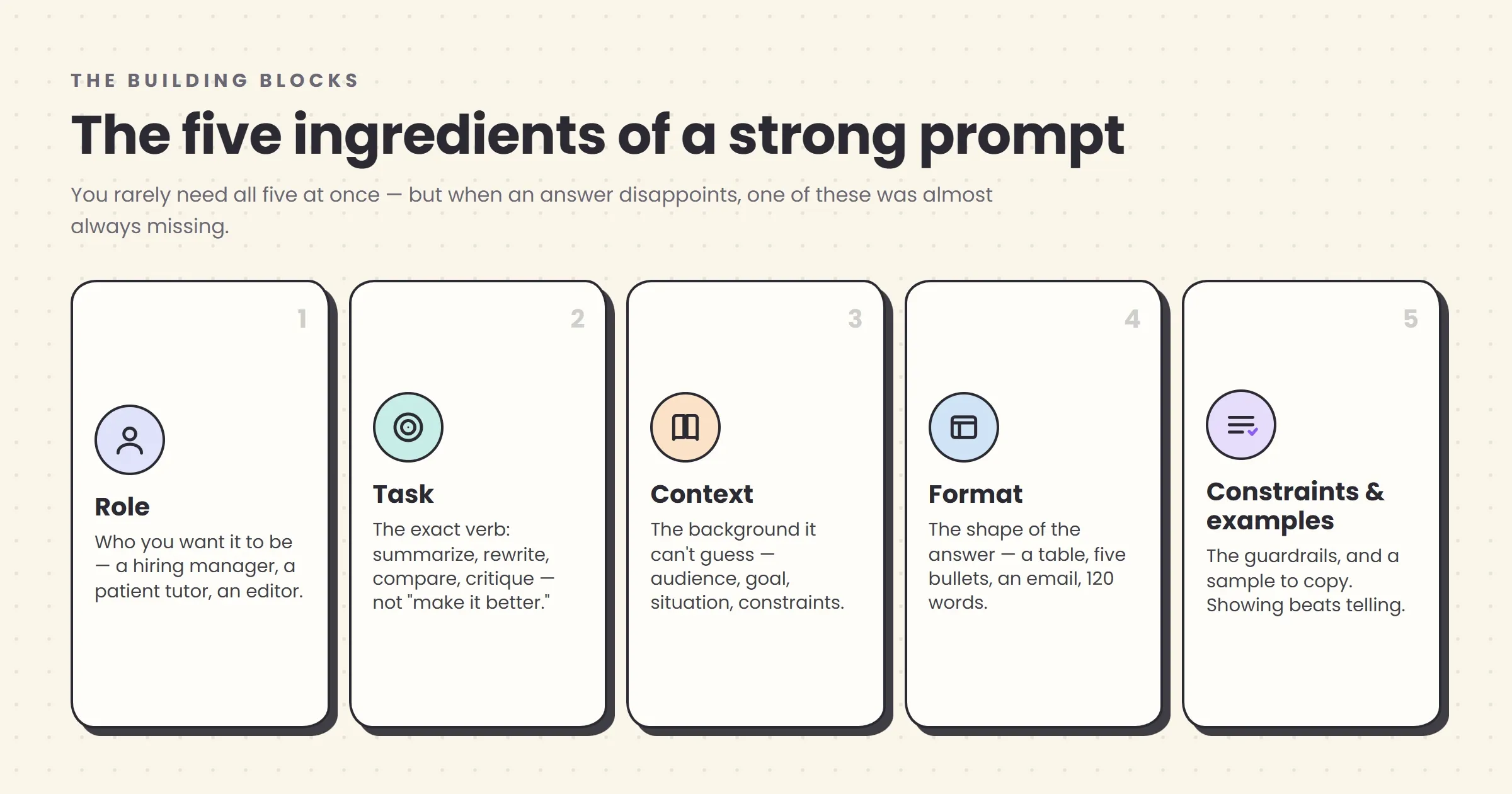
1. Role — who you want it to be. Telling the model what perspective to take (“You’re an experienced hiring manager,” “Act as a patient tutor explaining this to a beginner”) nudges it toward the right vocabulary, depth, and assumptions. It’s genuinely useful, with one caveat we’ll get to: a light touch beats an elaborate persona.
2. Task — what you actually want done. Be precise about the verb. “Summarize,” “rewrite,” “compare,” “brainstorm,” “critique,” and “explain” produce very different work. “Make this better” is not a task; “tighten this to half the length and make the tone more direct” is.
3. Context — the background it can’t possibly know. This is the ingredient non-technical users skip most, and the one that helps most. The model has no memory of yesterday and doesn’t know your situation. Who’s the audience? What’s the goal? What’s already been tried? What company, industry, or constraint is this for? Every relevant detail you add narrows the guessing.
4. Format — the shape you want the answer in. A table, a bulleted list, five options, a single paragraph, an email, 200 words, a script with speaker labels. If you don’t specify the shape, you’ll get the model’s default shape, and then you’ll spend time reformatting. Ask for the form up front.
5. Constraints and examples — the boundaries and a sample to copy. Constraints are the guardrails: “no jargon,” “keep it under 100 words,” “British spelling,” “don’t include a call to action.” Examples are the single most powerful ingredient of all — showing the model one piece of writing in the style you want teaches it more than a paragraph of description ever could. More on that shortly, because it deserves its own section.
Hold these five in mind and you have a diagnostic tool. When an AI answer disappoints you, don’t just re-roll it — ask which ingredient was missing. Nine times out of ten, the fix is obvious once you look at it that way.
Watch a weak prompt become a strong one
Abstract advice about “adding context” only lands when you see it happen. So here’s a single request, taken from a bad prompt to a good one, with nothing added except the five ingredients above.
Imagine you run a small dental practice and you want an email to lapsed patients. The instinctive first prompt looks like this:
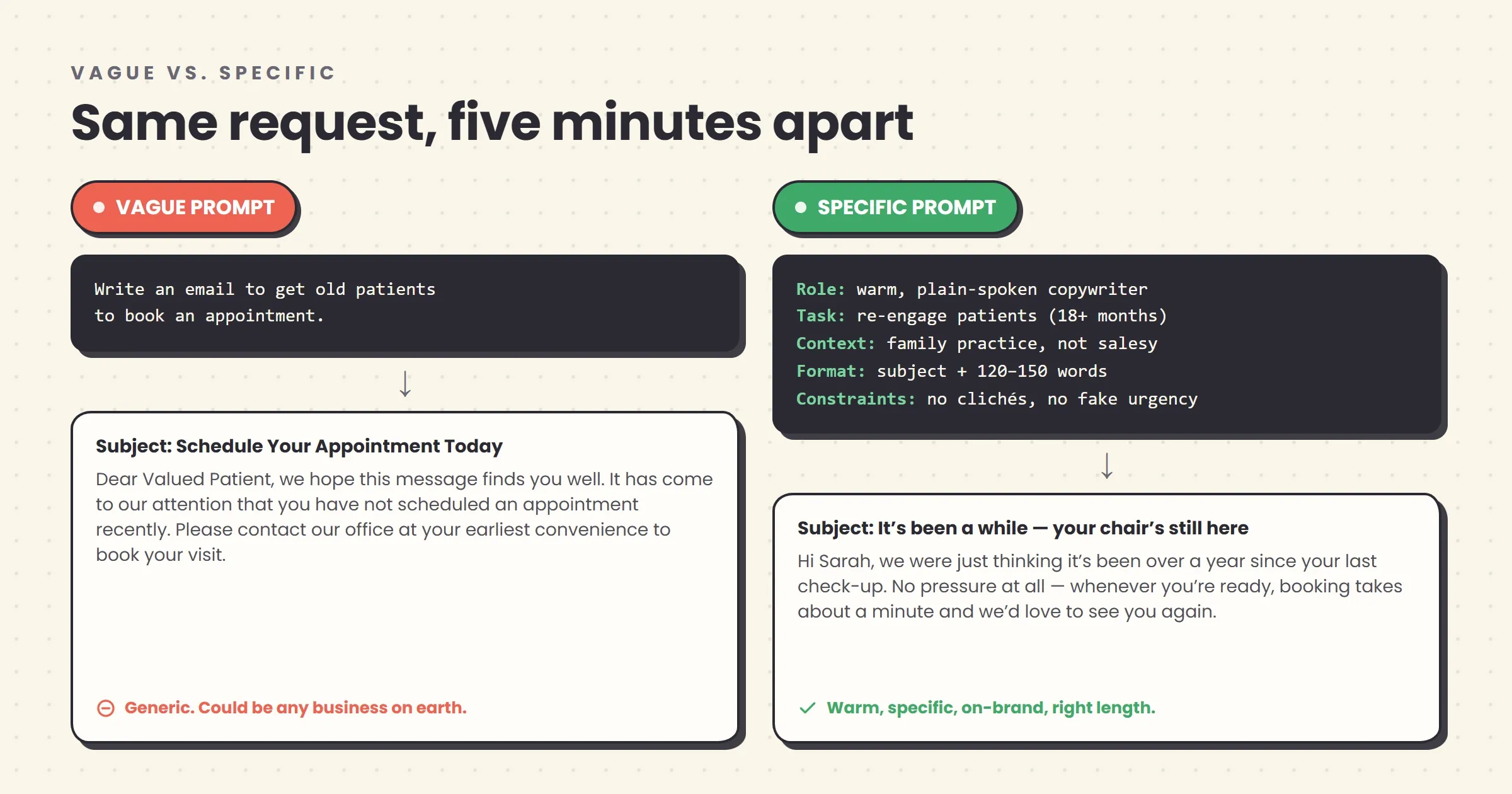
Write an email to get old patients to book an appointment.This will produce something. It’ll be a serviceable, faintly robotic email that opens with “We hope this message finds you well” and could have come from any business on earth. It’s not wrong. It’s just generic, because you gave it nothing to be specific about. Now the same request with the ingredients filled in:
Role: You're a warm, plain-spoken copywriter for a small local business.

Task: Write a short email to re-engage patients who haven't booked a
dental check-up in over 18 months.

Context: We're a family dental practice in a small town. Most of these
patients liked us — they just drifted after the pandemic. We are NOT
trying to sound corporate or salesy. The goal is to feel like a friendly
nudge from a practice that remembers them, not a marketing blast.

Format: Subject line plus 120–150 words. One clear button/link to book.
Short paragraphs.

Constraints: No "we hope this finds you well." No fake urgency or
discounts. Warm but not chummy. British spelling.
The second prompt isn’t more technical than the first. There’s no code, no jargon, no secret syntax — it’s just a clear brief, the kind you’d write for a competent freelancer. But the output changes completely. Instead of a generic template, you get an email that sounds like a specific small practice talking to specific people it remembers, in the right length, with the exact things you didn’t want stripped out. And crucially, if the result is still slightly off — too formal, say — you now know exactly which line to adjust.
That’s the whole game, really. The rest of this guide is just refinements on this one move: say more of what you actually mean, out loud, in the prompt.
Frameworks are training wheels, not the bicycle
Search “prompt engineering” and you’ll drown in acronyms: RTF, CO-STAR, RACE, CRISPE, RISEN, CRAFT, and a dozen more, each presented as a proprietary system. Here’s the honest truth about all of them: they are memory aids for the same handful of ingredients you just learned. Not one of them contains a secret the others lack. They exist because “remember to include role, task, context, format, and constraints” is easier to hold in your head as a five-letter word.
They’re genuinely useful in the way training wheels are useful — a scaffold while the moves become automatic. Three are worth actually knowing, from simplest to most complete.
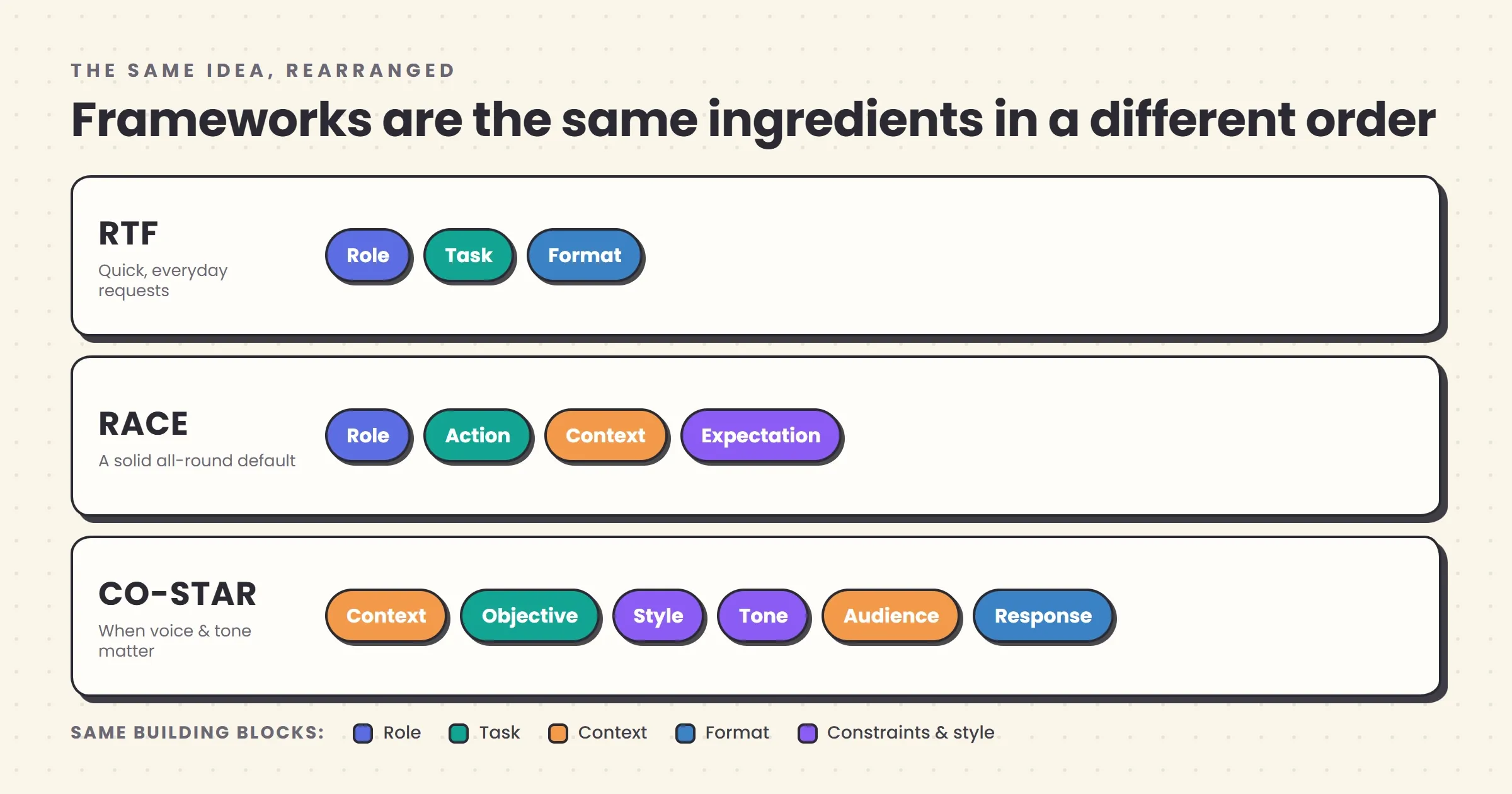
| Framework | Stands for | Best for | The gist |
|---|---|---|---|
| RTF | Role, Task, Format | Quick, everyday requests | The 20-second version. Who should it be, what should it do, in what shape. Covers most one-off tasks. |
| RACE | Role, Action, Context, Expectation | General-purpose work | Adds context and a clear definition of what “done well” looks like. A solid default for most real tasks. |
| CO-STAR | Context, Objective, Style, Tone, Audience, Response | Writing with a specific voice | The most thorough. Separates style, tone, and audience into their own slots — ideal when the voice of the output matters as much as the content. |
RTF is the one to actually memorize, because you’ll use it constantly: Role, Task, Format. It’s fast enough to apply to a throwaway question without breaking your stride. Reach for RACE when the task is real work and the stakes are a little higher. Pull out CO-STAR — which came out of Singapore’s government technology agency and got popular after one of its authors won a national prompt-writing competition — when you’re crafting something where the exact voice matters, like marketing copy or a delicate email.
But hold them lightly. The failure mode that shows up most often in people who’ve just discovered frameworks is treating them as mandatory paperwork — laboriously filling in six labeled fields to ask the AI what time zone to schedule a call in. The framework is there to stop you forgetting the ingredients, not to add ceremony. Once including context and format becomes second nature, you can drop the scaffolding entirely and just write a good brief. That’s the goal: not to memorize CO-STAR forever, but to reach the point where you no longer need it.
Five techniques that genuinely punch above their weight
Beyond the basic ingredients, there’s a small set of techniques that reliably improve results — not because they’re clever, but because each one works with the grain of how the model operates rather than against it. These are the ones worth building into your habits.
1. Show an example (this is the big one)
If you take one technique from this entire guide, take this one. Instead of describing the style, tone, or format you want, show the model a sample of it. This is called few-shot prompting — “few” because you’re giving it a few examples to imitate — and it is, for most everyday tasks, the single highest-leverage move available to you.
Why does it work so well? Go back to the intern. A literal-minded imitator is far better at copying a concrete example than at interpreting an abstract instruction. “Write in a friendly, professional tone” is genuinely ambiguous — friendly how? Professional to whom? But paste in one email you’ve written that nails the tone and say “match this voice,” and the guesswork collapses. Anthropic, the company behind Claude, puts examples near the top of its own prompting guidance for exactly this reason: they “show rather than tell,” clarifying requirements that are almost impossible to put into words.
In practice, this looks like: “Here are three of our past product descriptions. Write a fourth for this new product in the same style.” Or: “Rewrite this in the tone of the example below.” Two or three good examples usually get you most of the way there. Just be aware of the flip side — the model imitates your examples closely, so if your samples have a quirk you didn’t notice, you’ll get that quirk back. Choose examples that actually represent what you want.
2. Ask it to think step by step
For anything involving reasoning — a math or logic problem, a decision with trade-offs, a plan with dependencies — adding a simple instruction like “think through this step by step before giving your answer” measurably improves accuracy. This is called chain-of-thought prompting, and it’s one of the few prompting techniques with hard research behind it.
The evidence is striking. In a 2022 study, researchers found that simply appending the phrase “Let’s think step by step” to prompts raised one model’s accuracy on a set of grade-school math problems from 17.7% to 78.7% — the same model, the same questions, one added sentence. A companion line of research showed similar jumps when models were shown worked examples that spelled out the reasoning. The mechanism is intuitive once you know the model predicts text one piece at a time: forcing it to write out the intermediate steps means each step is generated in view of the last, instead of the model lurching straight to a final answer it then has to justify.
Modern reasoning models increasingly do this on their own behind the scenes, so you’ll need it less than you would have in 2023. But when an answer to anything with moving parts looks wrong, “walk me through your reasoning step by step” remains one of the most reliable fixes you have.
3. Give it a role — but don’t overdo it
Assigning a perspective (“You’re a skeptical financial analyst reviewing this pitch”) is a legitimate, useful technique. It shifts the model’s vocabulary, assumptions, and level of detail toward the right register. A prompt that starts “Explain this like a patient teacher talking to a curious 12-year-old” will genuinely read differently from one that starts “Explain this to a room of specialists.”
The caveat, and it’s one the labs themselves now stress, is that a light touch works better than an elaborate costume. The old advice to pile on grandiose personas — “You are the world’s greatest, most brilliant, Nobel-winning marketing genius” — mostly doesn’t help and can actively narrow the model’s usefulness. Anthropic’s current guidance actually cautions against heavy-handed personas for this reason. A plain, functional role (“act as an editor,” “respond as a UX researcher”) does the job. Save the theatrics.
4. Say what TO do, not what NOT to do
This one’s subtle and it comes straight from the “it predicts plausible text” mechanism. Telling the model what to avoid works far less reliably than telling it what you want instead. “Don’t be so formal” plants the concept of formality in the mix and often barely moves the result; “write this the way you’d text a friend who’s also a colleague” gives it a concrete target to aim at. Frame instructions positively. Instead of a list of don’ts, describe the thing you actually want. It’s the difference between telling someone “don’t think about a red balloon” and telling them “picture a green field.”
5. Give it explicit permission to be unsure
Because the model is eager and would rather answer than admit ignorance, it will sometimes fabricate — a fake statistic, a plausible-sounding source, a confident wrong number. One of the simplest counters is to grant permission for uncertainty directly in the prompt: “If you’re not sure, say so rather than guessing,” or “only use information from the document I pasted; if the answer isn’t there, tell me.” This won’t eliminate the problem — nothing fully does — but it measurably reduces confident invention, and it costs you one sentence. It pairs well with a habit we’ll cover: verifying anything that actually matters. (We go deep on why models make things up, and how to catch it, in our guide to AI hallucinations.)
The habit that beats every framework: iterate
Here’s the thing none of the acronyms tell you, because it can’t be packaged into a template: the single most important prompting skill isn’t writing one perfect prompt. It’s being willing to have a second, third, and fourth exchange.
Most people treat an AI chatbot like a vending machine. They put in one prompt, get back one answer, and if the answer is mediocre — which, on the first try, it often is — they conclude the tool isn’t very good and give up. The people who get genuinely useful results treat it like a conversation with that eager intern. They read the first draft, notice what’s off, and say so: “Good start, but make it half the length.” “The third point is the interesting one — expand that and cut the rest.” “Too formal. Loosen it up.” “You misunderstood — I meant X, not Y.” Each turn steers closer to what they actually wanted.
This is why the “prompt engineering is dead” crowd is missing something. Yes, models are now forgiving enough that a lazy first prompt often produces a decent first answer. But the ceiling — the difference between “decent” and “exactly what I needed” — still lives in the willingness to go a few rounds. Anthropic’s own guidance describes prompting as an iterative cycle of draft, test, and refine, and calls the idea that your first prompt will be perfect a mistake to unlearn. The best prompt writers aren’t the ones with the fanciest templates. They’re the ones who don’t accept the first answer.
A practical way to internalize this: after any weak result, don’t rewrite your prompt from scratch and re-roll. Instead, tell the AI what specifically to change about the answer it just gave. You’re not starting over; you’re editing. That framing — you as the editor, the AI as the tireless drafter — is the single most productive relationship to have with these tools, and it’s available to anyone regardless of technical background.
What’s actually a waste of your time
Half of getting good at this is knowing what to ignore. The prompt-engineering economy is full of advice that ranges from harmlessly useless to actively counterproductive. Here’s what you can drop.
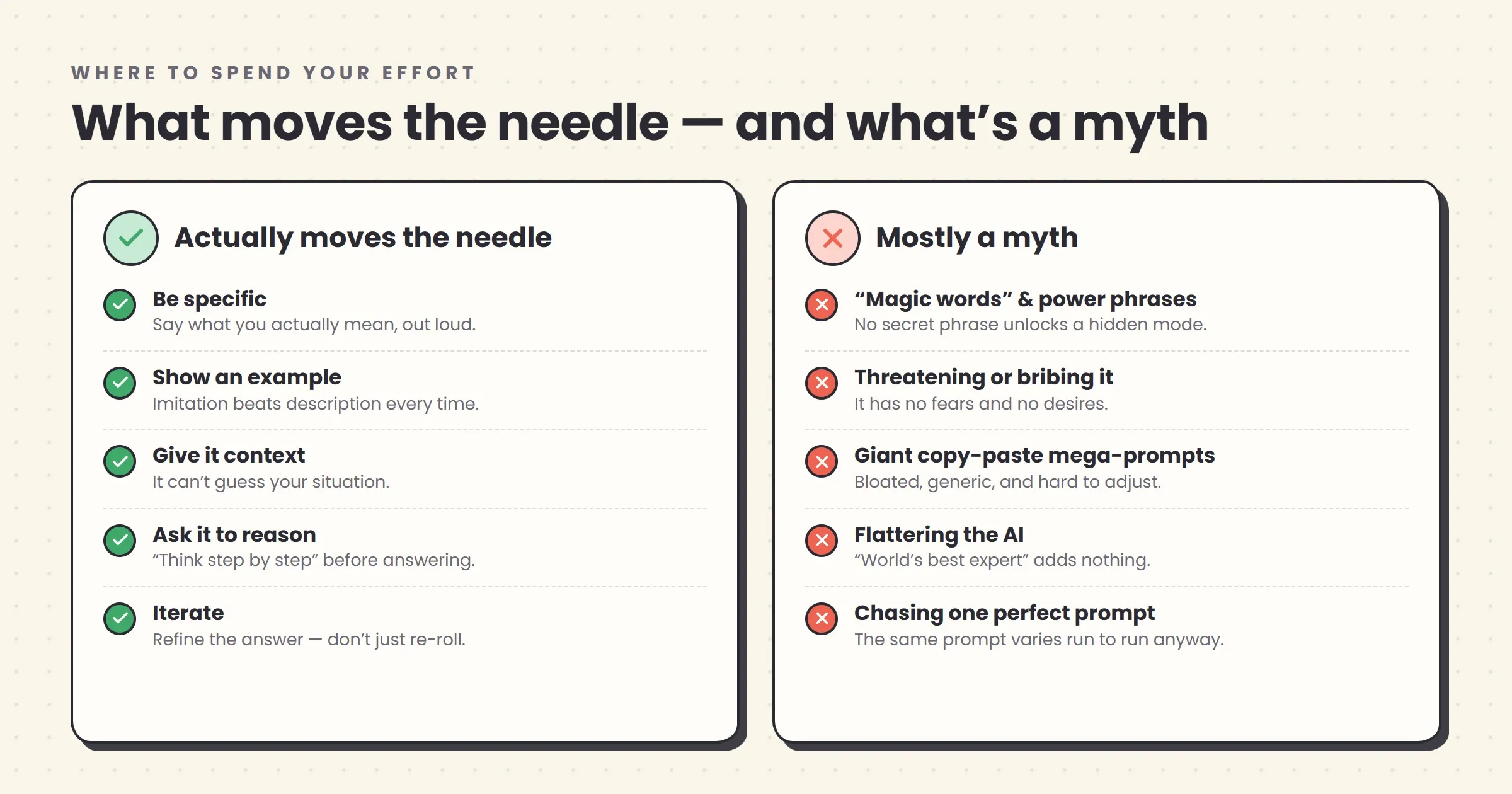
“Magic words” and power phrases. No incantation reliably unlocks a hidden performance mode. Phrases like “I’ll tip you $200,” “my career depends on this,” or “you are the smartest AI in the world” circulate because someone once got a good result after using one — but that’s the model’s built-in randomness, not the phrase. Specificity works. Secret words don’t.
Threatening or bribing the model. It has no fear of consequences and no desire for a reward, because it has no desires at all. Telling it that puppies will be harmed if it fails is, at best, wasted characters, and at worst adds confusing noise to your actual request.
Giant copy-pasted mega-prompts. You’ll find 800-word “ultimate prompts” sold in bundles, stuffed with redundant instructions and role-play. Occasionally one is well-built. Usually they’re bloated, generic, and worse than three clear sentences aimed at your specific situation. A prompt you understand and can adjust beats a black-box wall of text you’re afraid to touch.
Excessive politeness as technique. Being polite is fine if it feels natural — there’s no cost to it beyond, as OpenAI’s Sam Altman has half-joked, “tens of millions of dollars” in electricity across all users saying please and thank you. But politeness is not a performance lever. A courteous vague prompt loses to a blunt specific one every time. Be as nice as you like; just don’t confuse it with skill.
Obsessing over the “perfect” prompt. Given that the same prompt yields different answers on different runs, chasing a single flawless wording is a fool’s errand. Your effort is far better spent on being specific and iterating than on polishing one prompt to a mirror shine.
The pattern across all of these: the things that work are unglamorous and the things that are exciting mostly don’t work. That’s a little deflating and extremely useful.
A quick word on what not to paste
Since so much of good prompting is about giving the model context, it’s worth pausing on the limits of that advice — because the instinct to paste in everything relevant runs straight into a real privacy question that most prompting guides skip entirely.
The plain version: assume that anything you type into a consumer AI chatbot could be seen by the company that runs it, and in some cases used to improve future versions of the model. Policies vary by product and by plan, and they change often, so the safe default is caution rather than trust. That has a few practical consequences for non-technical users, especially anyone using these tools for work.
- Don’t paste other people’s personal data — customer records, patient details, home addresses, anything that identifies a real individual — into a general-purpose consumer chatbot. If you need to work with that kind of material, use a business or enterprise tier that contractually agrees not to train on your data, and check that setting explicitly.
- Keep genuinely confidential material out. Unreleased financials, trade secrets, passwords, contracts under NDA — treat the chat box like a semi-public space, not a private notebook. There have been real cases of employees pasting sensitive internal information into a chatbot and effectively leaking it.
- Anonymize when you can. You usually don’t need the real names to get the help you want. Replace “our client Acme Corp’s overdue invoice of £14,300” with “a client’s overdue invoice” and the AI can still draft your email perfectly well.
- Check the settings once. Most major tools now offer a way to turn off using your chats for training, and often a temporary or incognito mode. It takes two minutes to find, and it’s worth doing before you rely on the tool for anything work-related.
None of this means being paranoid or avoiding the tools. It means treating “add context” as “add the context you’re comfortable sharing” — a small adjustment that keeps the single most powerful prompting habit from becoming a liability.
So is prompt engineering actually dead?
Let’s deal with the headline directly, because you’ll keep seeing it. The claim that “prompt engineering is dead” is half true, and the half that’s true is good news for you.
What’s dying is the job title and the mystique. In 2023 it was possible to believe that prompting was an exotic technical specialty warranting a $335,000 salary and a dedicated hire. That era is over. Models got dramatically better at understanding sloppy, informal requests, so the premium on knowing the exact right syntax collapsed. Meanwhile the underlying skill — clearly instructing an AI — stopped being rare enough to build a whole career on and started becoming a basic part of ordinary knowledge work, the way “can use a spreadsheet” quietly became a baseline expectation decades ago. A specialist role dissolving into a general competency isn’t the skill dying. It’s the skill winning.
The other half of the “it’s dead” argument is a genuine shift in terminology worth understanding. In 2025, the influential AI researcher Andrej Karpathy argued for a better name: “context engineering” over “prompt engineering.” His point was that “prompt” makes people think of a short, clever question, when the real skill in any serious AI application is filling the model’s context — the whole window of information it’s working from — with the right background, documents, examples, and data. This is the same lesson our eager-intern-with-no-memory model has been teaching all along, scaled up: the AI can only work with what you put in front of it, so the quality of what you provide sets the ceiling on what you get back. Providing a relevant document to work from, rather than hoping the model remembers, is the everyday version of this — and it’s the same instinct behind more advanced setups like retrieval-augmented generation, where AI systems are wired to pull in real source documents before answering. It’s also why the skill matters more as AI moves toward autonomous agents that carry out multi-step tasks: the further the system runs on its own, the more it depends on the context and instructions you set up front.
So here’s the honest bottom line on the debate. If you were hoping to get rich purely by knowing prompt tricks, that window has largely closed. If you’re a non-technical person who wants AI tools to actually work for you in your real job — that skill is more relevant in 2026 than it has ever been, and the barrier to learning it has never been lower. The name might keep changing. The thing itself, communicating your intent clearly to a capable and literal system, is not going anywhere.
A ten-minute practice routine to actually get good
You don’t get better at this by reading about it, any more than you learn to drive by reading the manual. You get better by doing it deliberately for a little while. Here’s a short routine that builds real skill faster than any course.
- Pick a task you already do, and give it to the AI badly on purpose. Write the laziest one-line prompt for something real — a work email, a summary, a plan. Look hard at what’s generic or wrong about the result. This trains your eye for what was missing.
- Now add the five ingredients, one at a time. Add a role. Re-run. Add context. Re-run. Add a format. Re-run. Watch what each one changes. This is the fastest way to feel which ingredients matter for which tasks.
- Do the example test. Take a task where tone matters and try it two ways: once by describing the tone you want, once by pasting an example and saying “match this.” Notice how much better the second one is. That gap is the whole case for few-shot prompting, felt rather than told.
- Practice the follow-up. Take any mediocre answer and improve it using only follow-up messages — no rewriting the original prompt. “Shorter.” “More specific on point two.” “Wrong tone, try again like this.” Get comfortable steering mid-conversation.
- Verify one thing. Whenever the model states a fact you’d actually rely on — a statistic, a name, a claim — check it against a real source once. Building the verification reflex early is what separates people who use AI well from people who eventually get burned by it.
Fifteen minutes of that, a few times, will teach you more than any list of “500 power prompts.” The skill is in your hands and your judgment, not in a template.
Copy-and-adapt prompt templates
Templates are useful not as magic spells but as starting scaffolds you fill in and then abandon. Here are a handful for common non-technical tasks. Treat them as a first draft to adapt, not a script to worship — and remember the real work is the iteration afterward.
Summarize a long document for a specific purpose:
Summarize the document below for [who will read it] who need to [decision
or action they'll take]. Focus on [what matters most]; skip [what doesn't].
Give me [format: 5 bullet points / one paragraph / a table]. If something
important is unclear or missing from the document, flag it rather than
filling it in.

[paste document]
Draft something in your own voice:
Write a [email / post / message] about [topic] for [audience].
Match the tone of the example below — that's how I write.
Keep it to [length]. [Any must-haves or must-avoids.]

Example of my voice:
[paste something you wrote]
Think through a decision:
Help me think through [decision]. Here's my situation: [context,
constraints, what I've considered]. Lay out the main options with the
strongest argument for and against each, step by step. Then tell me what
you'd want to know that I haven't told you. Don't just agree with me.
Learn something new:
Explain [concept] to me. I know [your current level / a familiar analogy
that would help]. Use plain language, define any jargon the first time it
appears, and give me one concrete example. Then ask me one question to
check I actually understood it.
Get honest feedback on your work:
Review the [document / plan / draft] below as a [relevant expert role].
Be specific and candid — I'd rather hear the real problems now. Point out
the three weakest parts and exactly how you'd fix each. What have I missed?

[paste your work]
Notice that none of these are clever. They’re just the five ingredients, arranged for a common task, with a follow-up built in. Once you’ve used each a few times, you’ll stop needing them — which is the point.
Common misconceptions, cleared up
“Prompt engineering is a technical skill I’m not qualified for.” It’s a communication skill dressed in a technical-sounding name. The people who tend to be best at it — teachers, editors, lawyers, project managers — are usually the ones with no coding background at all, because the job is articulating exactly what you want, and that’s what they already do for a living.
“There’s a right prompt for each task, and I just need to find it.” There’s rarely one right prompt, and the same prompt won’t even give the same answer twice. Prompting is a range of good-enough approaches plus iteration, not a lock with a single key.
“Longer, more detailed prompts are always better.” Only up to a point. Relevant detail helps; padding, redundant instructions, and grandiose role-play hurt. The best prompt is the shortest one that removes the ambiguity — no longer.
“If the AI got it wrong, the tool is bad.” Sometimes. But far more often the prompt left something to guess, or the answer just needed one round of correction. Blaming the tool after one lazy prompt is like blaming a new colleague for misreading instructions you never actually gave.
“Newer, smarter models mean I won’t need to learn this.” Better models raise the floor — a sloppy prompt gets a better result than it used to. They don’t raise your ceiling. The gap between an average result and exactly-what-you-needed still comes down to how clearly you communicated, and that’s true no matter how capable the model gets.
“I should be polite so the AI treats me well.” The model has no memory of you between conversations and no feelings to hurt or win over. Be polite if you like being polite; it won’t change the quality of the output. Clarity will.
The bottom line
Prompt engineering got mythologized twice — first as a lucrative secret art, then as a dead fad — and both myths obscured something plain and genuinely worth knowing. Underneath the acronyms and the hype cycle, the whole skill reduces to a single, unglamorous idea: AI tools do what you clearly ask, not what you vaguely want, so learning to say exactly what you mean is most of the job.
Everything in this guide is a footnote to that. The five ingredients are a checklist for saying what you mean. The frameworks are memory aids for the same. Examples work because showing beats telling. Iteration works because your first attempt at saying what you mean is rarely your best. And the mental model of the eager, literal, forgetful intern is just a way to keep remembering that the machine on the other end only knows what you tell it.
You don’t need a course, a certificate, or a bundle of a thousand prompts. You need to internalize that one idea and then practice it on the actual work in front of you — badly at first, then a little better each time. That’s not engineering. It’s just clear communication, aimed at a strange and powerful new kind of tool. And it’s a skill that will keep paying off long after the next buzzword replaces this one.
If you’re just getting started, the fastest way to build the reflex is to pick one tool and use it daily. Our directory of AI chat assistants is a good place to compare the main options, and if any of the jargon in this piece is still fuzzy, the plain-English AI glossary defines the terms without the hand-waving. The best prompt you’ll ever write is the next one, refined from the last.
Frequently asked questions
Do I need to know how to code to write good prompts?
No. Prompt engineering is done entirely in plain language — the same English you'd use to brief a colleague. There's no programming, no special syntax, and nothing to install. Some of the strongest prompt writers come from non-technical backgrounds like teaching, journalism, and law, precisely because the skill is clear communication, not coding. If you can write a clear email explaining exactly what you need and why, you already have the core ability.
Is prompt engineering still worth learning in 2026, or is it dead?
The job title 'prompt engineer' is fading, but the skill is more useful than ever. What changed is that clearly instructing AI stopped being a specialist role and became a normal part of ordinary work — writing, research, analysis, admin. Modern models are more forgiving of sloppy prompts than early ones were, but the gap between a vague request and a specific one is still the difference between a mediocre answer and a genuinely useful one.
What's the difference between prompt engineering and context engineering?
Prompt engineering is about how you word a single request. Context engineering, a term popularized by AI researcher Andrej Karpathy in 2025, is the broader job of giving the AI all the right background — documents, examples, prior conversation, data — so it can actually solve the task. For everyday users, the practical takeaway is the same: the AI only knows what you put in front of it, so the quality of what you provide sets the ceiling on what you get back.
Does saying please and thank you to AI make it give better answers?
Not meaningfully. Politeness doesn't unlock hidden performance — clarity does. A blunt but specific prompt beats a courteous but vague one every time. OpenAI's Sam Altman has joked that the electricity spent processing 'please' and 'thank you' costs the company tens of millions of dollars. There's no harm in being polite if it feels natural, but don't mistake manners for technique.
Why does AI give me a different answer each time I ask the same question?
Because these systems are built to be a little unpredictable by design — they don't look up a fixed answer, they generate a fresh, plausible response each time, with a built-in element of randomness. That's why the same prompt can produce a great answer once and a weak one the next. It's not a bug, and it's a good reason to treat prompting as a conversation you refine rather than a single command you fire off.
What is the single most important prompting habit for a beginner?
Iterate. Treat your first prompt as a rough draft, read what comes back, and tell the AI specifically what to change — shorter, more formal, add examples, focus on X instead of Y. Most people give up after one weak answer; the people who get real value keep going for two or three rounds. This one habit outperforms every framework, template, and 'magic phrase' you'll ever be sold.
Related articles
How to Use ChatGPT, Claude, and Gemini Well
Most people barely scratch the surface of ChatGPT, Claude, and Gemini. A practical guide to the settings and habits that turn a beginner into a confident user.
AI Terms Explained: A Plain-English Glossary of 24 Words
The 24 AI terms everyone uses but nobody defines — LLM, tokens, RAG, agents and more — explained in plain English, with analogies that actually stick.
AI Hallucinations: Why AI Confidently Makes Things Up
AI hallucinations aren't random glitches. New research shows they're a predictable result of how models are trained and scored, and how to catch one.