
Free Alternatives to the Software You're Paying For
Somewhere in your bank statement is a subscription you forgot you had. Maybe it’s the video editor you used once for a wedding slideshow. Maybe it’s the note-taking app you meant to migrate away from two years ago. Software companies have gotten very good at making cancellation feel like more effort than it’s worth, and most of us just let it ride.
This is a guide to the other option: free tools that are good enough to actually replace the paid ones, organized by what you’re trying to do rather than by category buzzwords. Not “AI tools,” not “productivity hacks,” just — if you need to edit a podcast, automate a repetitive task, or clean up a PDF, here’s what works without a monthly charge.
The short version: if you’re paying for AI chat, image generation, photo or video editing, PDF tools, note-taking, or automation, there’s a good chance a free tool covers most of what you actually use. DeepSeek or Perplexity instead of ChatGPT Plus. DaVinci Resolve instead of Premiere Pro. Obsidian instead of Notion. n8n instead of Zapier. The exceptions are teams that need real support contracts, and workflows that are already pushing the paid tool to its actual limits, not just its sticker price.
One honest caveat before the list: this isn’t a claim that free is always better. Some of the tools below are direct, no-compromise replacements. Others involve real trade-offs — a steeper learning curve, a missing enterprise feature, an interface that looks like it hasn’t been touched since 2011. This guide aims to be specific about which is which, because the worst version of this kind of article oversells everything and leaves you to find out the hard way, three hours into a deadline.
(One more: prices below are approximate and current as of mid-2026. SaaS pricing moves around constantly, so treat these as ballpark figures rather than gospel.)
Why “free” doesn’t automatically mean “worse” anymore
For a long time, free software meant one of two things: a stripped-down trial designed to expire at the worst possible moment, or a genuinely open-source project that worked, but looked like it had been built by people who’d never met a designer. Neither one was really competing with the paid version. It was competing for your patience.
That’s changed, for a few boring, structural reasons rather than one exciting one.
Open-source projects have simply had more time. DaVinci Resolve, GIMP, Audacity, OBS Studio — most of the tools in this guide have been in active development for well over a decade. A decade of contributors fixing rough edges adds up, in the same slow way a decade of updates eventually made Windows tolerable to use.
Distribution also got cheap. Twenty years ago, giving software away meant someone had to eat the cost of hosting, storage, and support for every free user, with no guarantee any of them would ever pay. Today a browser-based tool can run mostly on the user’s own device, and a cloud tool can be hosted for a few dollars a month even at real scale. A generous free tier stopped being an act of charity and became a normal way to acquire customers — the same logic that made Gmail and Google Docs free in the first place, just applied by a much wider range of companies now.
And a wave of newer, well-funded tools — Krea, Ideogram, Fathom, Cal.com — launched free-first on purpose, because in a crowded market, the fastest way to get people to try something is to not ask for a credit card up front. Some of these will eventually need to charge more in order to survive. Some already do, for teams or heavy usage. That’s a genuine risk worth keeping in mind, and this guide returns to it near the end.
A quick note on how to use this guide
Don’t try to replace everything on this list in one weekend. Pick the subscription that annoys you most, the one where you wince slightly every time it renews, and start there. Most of these tools have a real learning curve somewhere between twenty minutes and a full weekend, which is a bad trade if you’re doing it for six different tools in the same week, and a perfectly reasonable one if you do it once a month.
The sections below are organized by job, not by app category, because that’s closer to how the decision actually happens. You don’t wake up wanting “a diagramming tool.” You want to explain a process to your team before the 2pm meeting, and a diagram is just the fastest way to do it.
AI chat and research — instead of ChatGPT Plus
ChatGPT Plus, at around $20 a month, buys you priority access and the newest models first. That matters if you’re using it for hours every day. For most people asking questions, drafting emails, or researching a topic a few times a week, it’s a lot of money for something with credible free options.
DeepSeek is the most direct swap: a frontier-class model with a free tier that doesn’t feel like a downgrade in everyday use. Perplexity is built specifically for research, and its answers come with sources attached, which matters more than people expect until the first time a chatbot confidently makes something up. NotebookLM does something genuinely different: point it at your own documents — PDFs, notes, transcripts — and it answers only from what you gave it, with citations back to the exact source. If you’ve ever wanted an assistant that has actually read the 40-page report before your meeting, this is a lot closer to that than a general-purpose chatbot.
Image generation — instead of Midjourney
Midjourney runs about $10 a month at the entry tier, and it’s paid through Discord, which is a small barrier of its own. The free alternatives have closed most of the quality gap for anything short of professional commercial work.
Ideogram is worth trying first if you need any text inside the image — a poster, a logo, a meme — because most image generators still make a mess of lettering, and Ideogram is one of the few that mostly doesn’t. Leonardo gives you a real daily allowance of free generations rather than a one-time trial, which makes it usable as an ongoing tool instead of a demo you exhaust in an afternoon. Krea generates images in real time as you sketch or type, which sounds like a gimmick until you’ve used it and gone back to typing-then-waiting feeling genuinely slow.
Photo editing — instead of Photoshop
Photoshop’s single-app plan runs around $23 a month, which is a strange amount of money for something most people use to crop a photo and fix the exposure.
Photopea is the closest thing to a direct clone. It runs entirely in a browser tab, opens PSD files natively, and uses a menu layout close enough to Photoshop’s that the relearning curve is close to zero if you already know your way around one. GIMP is the deeper, install-it-properly option: more powerful, less immediately familiar, and considerably improved from the clunkier version a lot of people remember. Krita is built specifically for painting and digital art rather than photo retouching, and if that’s actually your use case, it’s a better fit than either of the other two.
Vector graphics and icons — instead of Illustrator
Illustrator is another roughly $23-a-month single-app plan. Inkscape is the full open-source vector suite and covers most of what Illustrator does, with an interface that takes some relearning if you’re coming from Adobe’s conventions. Recraft is newer and AI-native: describe a logo or an icon set and it generates clean, editable vector output, which is a genuinely different workflow than drawing everything by hand. And if you just need icons rather than original artwork, Iconify gives free access to more than 200,000 open-source icons across dozens of icon sets, all searchable in one place.
Video editing — instead of Premiere Pro
Premiere Pro is roughly $23 a month on its own. DaVinci Resolve is the one to actually know about here, because its free tier isn’t a stripped-down trial. It’s the same professional editing and color-grading tool used on real film sets, with the paid Studio version mainly adding things like the AI neural engine tools, multi-GPU rendering, and support for extreme resolutions. Unless you’re doing high-end post-production professionally, you’re unlikely to ever hit that ceiling.
CapCut is the better call if you’re editing quick, vertical, social-style content and want speed over fine control. Kdenlive is the open-source, cross-platform option, a reasonable middle ground if Resolve feels like more tool than you need.
Audio and podcasts — instead of Adobe Audition
Audition runs about $23 a month. Audacity has been the standard free audio editor for close to twenty years and still holds up for cutting, mixing, and basic cleanup. For the specific, tedious problem of bad recording audio — room echo, background hum, a voice that sounds like it was recorded in a bathroom — Adobe’s own free Podcast Enhance tool will clean it up in one pass, no subscription required, which is a slightly funny thing for Adobe to give away next to a paid app that does less of it automatically. Auphonic handles the last mile: automatic leveling and loudness normalization, so your episode doesn’t jump in volume between speakers, with a free tier that covers a reasonable number of processing hours a month before you’d need to pay.
Screen recording — instead of Camtasia
Camtasia is sold as a one-time purchase around $300, which is steep for something most people use a handful of times a year. OBS Studio is the open-source standard, originally built for game streamers but perfectly capable of recording a clean screen tutorial. Screenity is a lighter option: a free Chrome extension with built-in annotation and no account required, good for something quick and low-stakes. Tella is worth paying for if you’re making polished product demos regularly and want auto-zooming and clean camera layouts without a separate editing pass afterward.
Writing and grammar — instead of Grammarly
Grammarly’s paid tier runs about $12 a month. LanguageTool covers the same core ground — grammar, spelling, style suggestions — as a browser extension, built on an open-source core. Hemingway Editor does something different and, for a lot of writing, more useful: it flags when your sentences are too complex or too passive, which is a harder problem than spelling and one Grammarly spends less attention on. QuillBot adds paraphrasing and citation generation, handy for the sentence you’ve rewritten five times and it still sounds wrong.
Notes and your second brain — instead of Notion or Evernote
Notion and Evernote both land somewhere between $8 and $15 a month depending on the plan. The free alternatives here are arguably better for personal notes specifically, because they store files locally on your device instead of a company’s server, which means no subscription, no lock-in, and no risk of losing access if a startup eventually shuts down.
Obsidian is the most popular of these — plain markdown files in a folder you fully control, with a large plugin ecosystem for anyone who wants to go deeper. It’s free for personal use, though a commercial license is required for company use, worth knowing if you’re setting this up for a team rather than just yourself. Logseq is similar but outliner-based, built around daily notes and linking ideas together as you write them. Anytype is the newest and most private of the three, encrypted and offline-first by design.
PDF tools — instead of Acrobat Pro
Acrobat Pro runs about $20 a month for something most people need in five-minute bursts: merging a few pages, signing a form, compressing a file before emailing it. Stirling PDF is the most complete option, open-source with more than 60 tools, and it can be self-hosted if you’d rather your documents not touch someone else’s server at all. iLovePDF and LightPDF are simpler browser-based options if you just need to do one thing quickly and don’t want to think about hosting anything yourself.
Diagrams and whiteboards — instead of Miro or Lucidchart
Miro and Lucid pricing lands somewhere between $8 and $16 a month per person, which adds up fast across a team. Excalidraw has become the default for quick, hand-drawn-style sketches and system diagrams, the kind of thing you make once during a conversation and rarely touch again. draw.io — confusingly also known as diagrams.net — is the more formal option for actual flowcharts and UML diagrams, and it has been completely free for its entire existence. tldraw sits in between: a live, collaborative canvas for when several people need to draw on the same board at the same time.
Automation — instead of Zapier
Zapier runs about $20 a month for a fairly modest number of monthly tasks, and the price climbs quickly from there. Make is the most direct comparison: same core idea, a visual workflow builder connecting apps together, and generally cheaper at every tier if you do end up paying for it. n8n is the one worth understanding properly, because it’s open-source and, if you’re willing to run it on your own small server, genuinely unlimited for free. That’s a real trade-off rather than a free lunch: it means you’re now responsible for a small piece of infrastructure instead of paying someone else to handle it for you. Activepieces is a newer, similarly open-source alternative if n8n’s interface doesn’t click for you.
A few more one-line swaps
Some categories don’t need a full section, just a straightforward substitution:
| Instead of | Try |
|---|---|
| 1Password | Bitwarden |
| Calendly | Cal.com |
| Webflow | Framer |
| Topaz Gigapixel | Upscayl |
| Otter.ai | Fathom |
Fathom deserves a specific mention here: its free plan is unusually generous for an AI meeting notetaker, with no cap on the number of recordings. Most competitors in this space treat their free tier as a taste test designed to run out; Fathom’s is closer to a genuinely usable product.
Where free genuinely isn’t the answer
This is the part most lists like this skip, because it undercuts the pitch. It shouldn’t.
Support is community-based, not contractual. When a paid tool breaks, you can usually open a ticket and expect an answer within a business day or two. When an open-source tool breaks, you’re often searching a GitHub issues page or a Discord server and hoping someone with the same problem already solved it. For anything genuinely time-sensitive, that difference matters.
Enterprise features are usually the first thing missing. Single sign-on, admin controls, audit logs, compliance certifications like SOC 2 or HIPAA — these tend to be paid-tier features even on tools that are otherwise free, and sometimes they’re absent from the free tool entirely. If your use case involves a company’s compliance requirements, check this before you commit.
Free tiers can shrink or disappear. Several of the tools in this guide are backed by venture funding, and venture-funded companies eventually need to turn a profit. A generous free tier today is not a permanent promise. This isn’t a reason to avoid these tools, but it is a reason not to build something business-critical entirely on top of a free plan without a fallback.
Self-hosting is a real trade, not a hack. Running n8n or Stirling PDF on your own server swaps a monthly subscription for a small amount of ongoing responsibility: updates, backups, the occasional troubleshooting session. For some people that’s a completely reasonable trade. For others, the subscription was worth it specifically to avoid ever thinking about it again, and that’s a legitimate reason to keep paying.
And on data: if you’re not paying for it, check what you’re paying with instead. This matters most for free AI tools specifically. Tools that keep your data entirely on your own device — Obsidian, Anytype, GIMP — genuinely don’t have this issue. Cloud-based free AI tools generally collect some usage data to improve their models, which is often a reasonable trade for casual use, but not one you want to make by accident with anything sensitive.
Start with one thing
You don’t need to read this whole guide and rebuild your entire toolkit this weekend. Pick the one subscription on your statement that makes you flinch, try its free alternative for a week, and see whether the trade-off is one you actually notice day to day. If it is, you’ll know within a few days. If it isn’t, you’ve just quietly given yourself back a few hundred dollars a year for the cost of one afternoon.
This list will keep changing. New free tools will show up, and — per the point above — some of today’s generous free tiers will eventually start charging for what used to be included. This guide will be updated as that happens. If you want the shorter, more frequent version of this kind of thing, that’s what @BeingAiReady is for.
Frequently asked questions
Are free alternatives to paid software actually safe to use?
For the tools in this guide, yes, with one distinction worth making. Open-source tools like Audacity, OBS Studio, and Obsidian have publicly auditable code and large user communities, which is a real trust signal. Free cloud AI tools are a slightly different case: they're generally safe to use, but you should assume that free usage may be used to improve the underlying models unless the provider states otherwise, so avoid pasting anything genuinely sensitive into a free AI chat tool.
What's the best free alternative to Photoshop?
Photopea is the closest direct replacement. It runs in a browser tab, opens PSD files natively, and mirrors Photoshop's menu layout closely enough that the learning curve is minimal. GIMP is the more powerful open-source option if you're willing to relearn a different interface, and Krita is better suited if your work is digital painting rather than photo editing.
Is DaVinci Resolve really free, or is it a limited trial?
The standard version of DaVinci Resolve is free with no time limit and no watermark, not a trial. It includes professional-grade editing, color correction, and audio tools. The paid Studio version adds extras like the AI neural engine tools, multi-GPU rendering, and support for very high resolutions, none of which most people will ever need.
Can free tools really replace ChatGPT Plus?
For most everyday use, yes. DeepSeek offers a free tier built on a frontier-class model, and Perplexity is arguably better suited to research since it cites its sources. ChatGPT Plus still makes sense if you're a heavy daily user who needs priority access to the newest models the moment they launch.
What's the actual catch with free software?
Three things, mainly. Support is community-based rather than a phone line, which can mean slower answers when something breaks. Enterprise features like single sign-on and compliance certifications are usually paid-only or missing entirely. And free tiers from venture-funded startups can shrink or disappear if the company changes its pricing strategy, so it's worth having a backup plan for anything business-critical.
How much money can switching to free tools actually save?
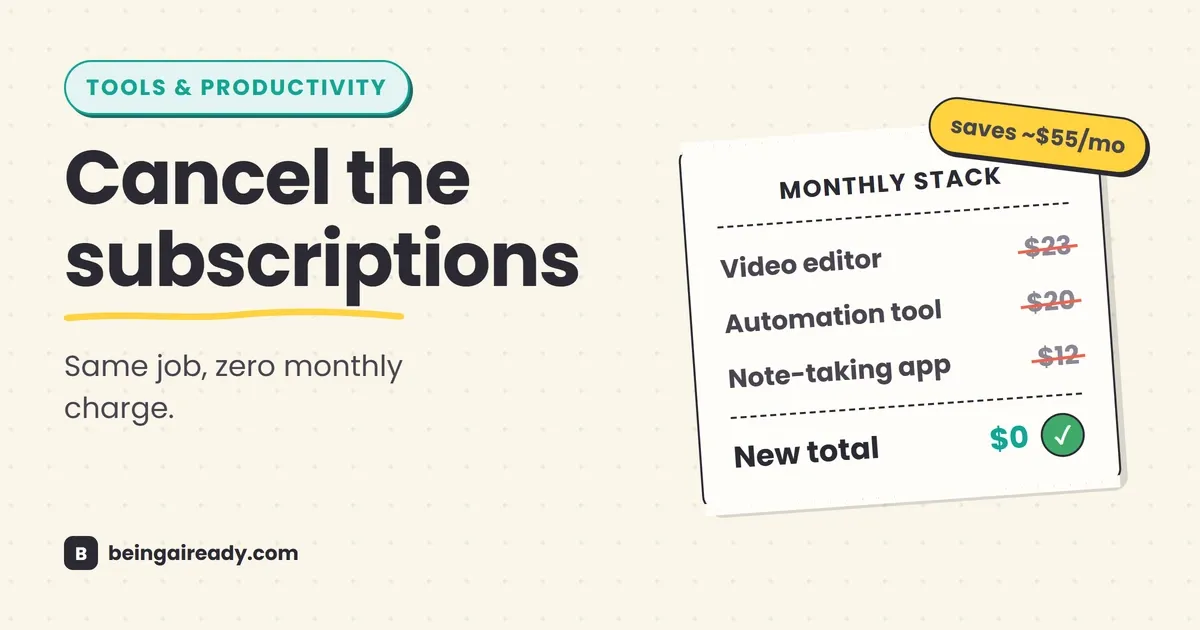
It depends entirely on what you're currently paying for, but the numbers add up faster than people expect. A single-app Adobe plan runs about $23 a month, Zapier's mid-tier is around $20 a month, and a note-taking app subscription is another $10 to $15. Swapping out even four or five paid tools for free equivalents commonly saves somewhere in the range of $1,000 to $2,000 a year.
Related articles
60 Websites You Wish You Knew Earlier (2026 Edition)
60 free, underrated websites for research, writing, design, video, productivity and job hunting — organized by what you're actually trying to do.
The Complete AI Tool Stack for Solopreneurs
A practical, job-by-job AI tool stack for solopreneurs: what to use for writing, email, marketing, admin, and support, what it actually costs, and what to skip.
42 Underrated AI Tools Worth Using in 2026
Most people's AI toolkit stops at ChatGPT. Here are 42 practical AI tools, organized by the job you're doing, that quietly save people real time in 2026.